Best ERP Automation Tools in 2026 (Top Platforms Reviewed & Compared)
Explore the best ERP automation tools for SAP, Oracle and NetSuite. Compare Noxus, UiPath, Celonis and SAP Build to automate ERP processes.

Noxus is our pick among the best ERP automation tools in 2026 for enterprises whose processes start outside the ERP and have to finish inside it. It carries each case from an email, document or portal submission through agents, rules and people, then writes the outcome into SAP, Oracle or the ERP you already run.
ERP systems record orders, invoices, suppliers and stock well. The work that moves those records, such as matching an invoice to a delivery or opening a supplier claim, still happens across inboxes, spreadsheets and several screens.
We built Noxus, so read the first entry with that in mind. The other nine draw on published product information and verified G2 and Capterra reviews.
Key Takeaways (TL;DR)
Why Do You Need It: ERP records are only as current as the people keying data into them, and in most enterprises that means manual entry, reconciliation and chasing across several systems. ERP automation software runs those processes around the ERP, so records update without a person bridging every gap.
Who It's For: Finance, procurement, supply chain and quality leaders in organisations running SAP ECC, S/4HANA, Oracle or NetSuite with high transaction volumes. It also suits ERP and IT teams who need automation that respects the ERP as the system of record.
The Best Overall ERP Automation Tool: Noxus. It runs the full process around the ERP, from unstructured intake to write-back into inspection lots, goods receipts and invoices, with exceptions routed to the right team and every action recorded.
What Sets Noxus Apart: It writes outcomes into ERPs that expose no modern API, including on-premises SAP ECC through an agent placed next to the database, without an ERP upgrade or middleware project first.
How to Choose the Right One: Check whether the tool writes back into your ERP or stops at extraction. Then test exception handling on real mismatches and confirm where it can run next to your ERP.
Table of Contents
Top ERP Automation Tools in 2026 at a Glance
Company | Best For | Key Features | Pros | Cons |
Noxus | ERP processes that start in unstructured intake and finish in SAP, Oracle or proprietary ERPs | Process runtime with ERP write-back, Work Queue and Case, agents and deterministic flows, SAP OData integration, on-premises agents, 400+ connectors | Writes into ERPs without modern APIs; exceptions routed with context; deploys next to the ERP | Sales-led evaluation with a scoped first process; built for operational processes; small public review base |
UiPath | Extending an RPA estate across SAP GUI, Oracle and legacy screens | UI and API automation, agents, document understanding, Maestro, Orchestrator | Reaches ERP screens with no API; mature governance; large community | Expert setup; learning curve; intricate licensing |
Celonis | Finding where order-to-cash and procure-to-pay break inside the ERP | Process mining, Process Intelligence Graph, Action Flows, orchestration, ERP connectors | Shows ERP process reality with data; deep SAP and Oracle connectors; tracks improvement | Learning curve; data engineering effort; execution relies on other tools |
SAP Build | SAP customers extending S/4HANA and SAP BTP with low-code | SAP Build Process Automation, SAP Build Apps, Joule, prebuilt SAP content | Native SAP integration; prebuilt workflows for SAP processes; business users build approvals | Limited outside SAP; customisation limits; slow in places |
Automation Anywhere | Modernising ERP-facing RPA with agents | Agentic process automation, Document Automation, AARI, cloud control room | Strong on invoices and documents; cloud-native; RPA to agents path | Steep learning curve; bugs and bot issues; cost |
RunMyJobs by Redwood | Scheduling and orchestrating ERP batch jobs and finance close | SaaS workload automation, SAP job scheduling, file transfer, SLA monitoring | Deep SAP job integration; high reliability; strong visibility | Learning curve; interface could improve; scheduling rather than case work |
Workato | Integrating a cloud ERP with SaaS apps across the business | Recipes, large connector library, API management, agentic automation, governance | Fast integration building; strong support; cloud ERP connectors | Learning curve; complexity at scale; data volume limits |
Boomi | Connecting ERPs to CRM, HR and data systems with low-code integration | Integration, API management, master data hub, Agentstudio, prebuilt connectors | Low-code integration; strong NetSuite and SAP connectors; active community | Troubleshooting is hard; reporting is limited; support response times |
Tungsten Automation | Capturing invoices and documents into ERP workflows | TotalAgility, intelligent document processing, OCR, process orchestration, AP automation | Strong document capture; low-code process design; long AP heritage | Interface feels dated; complex implementations; handwriting OCR limits |
Microsoft Power Automate | Automating Dynamics 365 and Microsoft-connected ERP tasks | Cloud flows, desktop flows, ERP connectors, approvals, process mining | Close Microsoft fit; desktop flows for ERP screens; accessible | Complex flows hard to debug; weaker outside Microsoft; state spread across tools |
[Visual 2: Comparison infographic] ERP automation tools mapped by what they touch: the ERP screen, the ERP API, the ERP database, the documents feeding it, and the process around it. WebP, under 150KB. Alt text: ERP automation software compared by where each tool connects to the ERP
What Are ERP Automation Tools?
ERP automation tools are software that runs the work around an ERP, so records are created, matched and updated without people keying them in. They cover processes such as procure-to-pay, order-to-cash, record-to-report, supplier onboarding and quality management.
An ERP is excellent at storing the order, the invoice and the supplier. It is less good at getting a PDF invoice from an inbox, matching it against a purchase order and a delivery note, resolving a price difference and posting the result, which is where most finance and supply chain effort goes.
The category mixes several kinds of software. RPA tools operate ERP screens the way a person would, integration tools move data between the ERP and other applications, workload automation schedules ERP batch jobs, process mining shows how ERP processes run in practice, and ERP vendors' own low-code tools extend their suites.
ERP automation platforms increasingly add AI to read documents and handle judgement steps. The question that separates them is what happens after the AI step: whether the software posts the result to the ERP, routes the exceptions and keeps a record of both.
This guide compares the ERP automation software buyers shortlist most often, with the ERP as the system that has to end up correct.
Why Do You Need ERP Automation Tools?
Most ERP-related work begins outside the ERP. Invoices arrive as PDFs, supplier certificates as email attachments and customer disputes as free text, and someone has to read them before the ERP can be updated.
In the operations we map, staff commonly move between three and seven systems per case and re-enter data by hand. At volume, manual error rates of 3% to 8% are common, which shows up as duplicate payments, mismatched stock and audit findings.
ERP projects rarely fix this. A migration from ECC to S/4HANA changes the system of record but not the inbox, the spreadsheet or the approval chain around it, and many organisations are deciding to keep ECC for another cycle anyway.
Earlier automation hit limits. Bots that operated SAP GUI screens broke when a transaction changed, and document capture tools extracted data that still needed someone to validate and post it.
The best ERP automation tools close that loop. Documents are read, data validated against ERP rules, exceptions routed to the right person and outcomes written back, so finance and operations teams spend time on the mismatches that need judgement.
The results show up in days payable outstanding, first-pass match rates, close cycle time and audit readiness. For the broader picture beyond the ERP, our guide to the best end-to-end process automation software compares tools that run whole processes across systems.
Best ERP Automation Tools: In-Depth Review & Comparison
We judged each tool on how it handles ERP work in production: what it can read, how it reaches the ERP, whether it writes back, how it deals with mismatches and where it can be deployed.
Ratings and review themes come from G2 and Capterra as of September 2026.
1. Noxus

Overview
Noxus is the process layer for enterprise operations, and ERP-bound processes are where it most often starts. It holds the process logic and case state that move work across agents, people and systems, and writes each outcome into the system of record with every action recorded.
Founded in 2023 and based in London and Lisbon, we run in production at Santander, Jerónimo Martins, CUF, KIRCHHOFF Automotive and Carlsberg Group. At Carlsberg Group, supplier invoices are reconciled against purchase orders and delivery records, with only the exceptions reaching finance.
The ERP stays authoritative. SAP remains the record for the order and the invoice, while Noxus holds how the case moves from the inbox to a posted result.
At KIRCHHOFF Automotive, production operations connect directly to SAP through OData, from intake to write-back. For on-premises estates with no modern API, Noxus places an agent next to SAP on the client's own servers.
[Visual 3: Noxus supplier invoice process] A reconciliation case showing email intake, extraction, three-way match against SAP MM, a price-variance exception routed to finance, and posting. WebP, under 150KB. Alt text: Noxus running invoice reconciliation, one of the best ERP automation tools for SAP and Oracle
Ideal For
Finance and shared services leaders running invoice matching, reconciliation and dispute handling at volume
Procurement and supply chain teams managing supplier onboarding and delivery reconciliation
Manufacturing quality teams working supplier documents and claims against SAP QM and MM
ERP and IT leaders who need automation to write back under governance without an API programme
Organisations facing an S/4HANA decision who want process automation that works on ECC and S/4HANA alike
Top Features
ERP write-back under governance. Outcomes land in inspection lots, goods receipts, quality notifications, invoices and customer records, so processes finish with the ERP record updated.
Three deployment patterns for ERP estates. Fully self-hosted next to the ERP, hybrid with only orchestration signals crossing the boundary, or an on-premises agent talking directly to the database.
Agents and deterministic flows in one process. Agents read invoices, certificates and free-text requests, while exact rules such as tolerances, thresholds and approval limits stay deterministic.
Exception queues with context. Mismatches pause and reach the right team with the document, extracted data, failure reason and ERP context already assembled.
Complete execution record. Every read, decision, write and intervention is recorded against the case and exportable to your SIEM or audit tooling.
Why We Stand Out
We run the whole process around the ERP. The case holds its state from the moment an invoice or claim arrives until the ERP record is correct, however many days and people it takes.
Reach is the second reason. Noxus works with SAP ECC, S/4HANA, Oracle and proprietary ERPs without modernising them first, which matters when an ERP upgrade is years away or deliberately postponed.
Deployment closes most ERP conversations. The process can run on the same infrastructure as the ERP, including on-premises and air-gapped, with bring-your-own-key encryption, no training on client data and all code and binaries retained by the client if the relationship ends.
Pros
Writes outcomes into SAP, Oracle and proprietary ERPs, including ones with no modern API
Runs agents for document reading and deterministic rules for tolerances and approvals in one process
Routes mismatches to the right team with full ERP context attached
Deploys self-hosted, hybrid or on-premises next to the ERP
Records every action per case for audit and SIEM export
Cons
A sales-led evaluation with a scoped first process rather than a self-serve trial
Built for operational processes, so ERP reporting or analytics projects are a weaker fit
A small public review base compared with established automation vendors
Customer Reviews
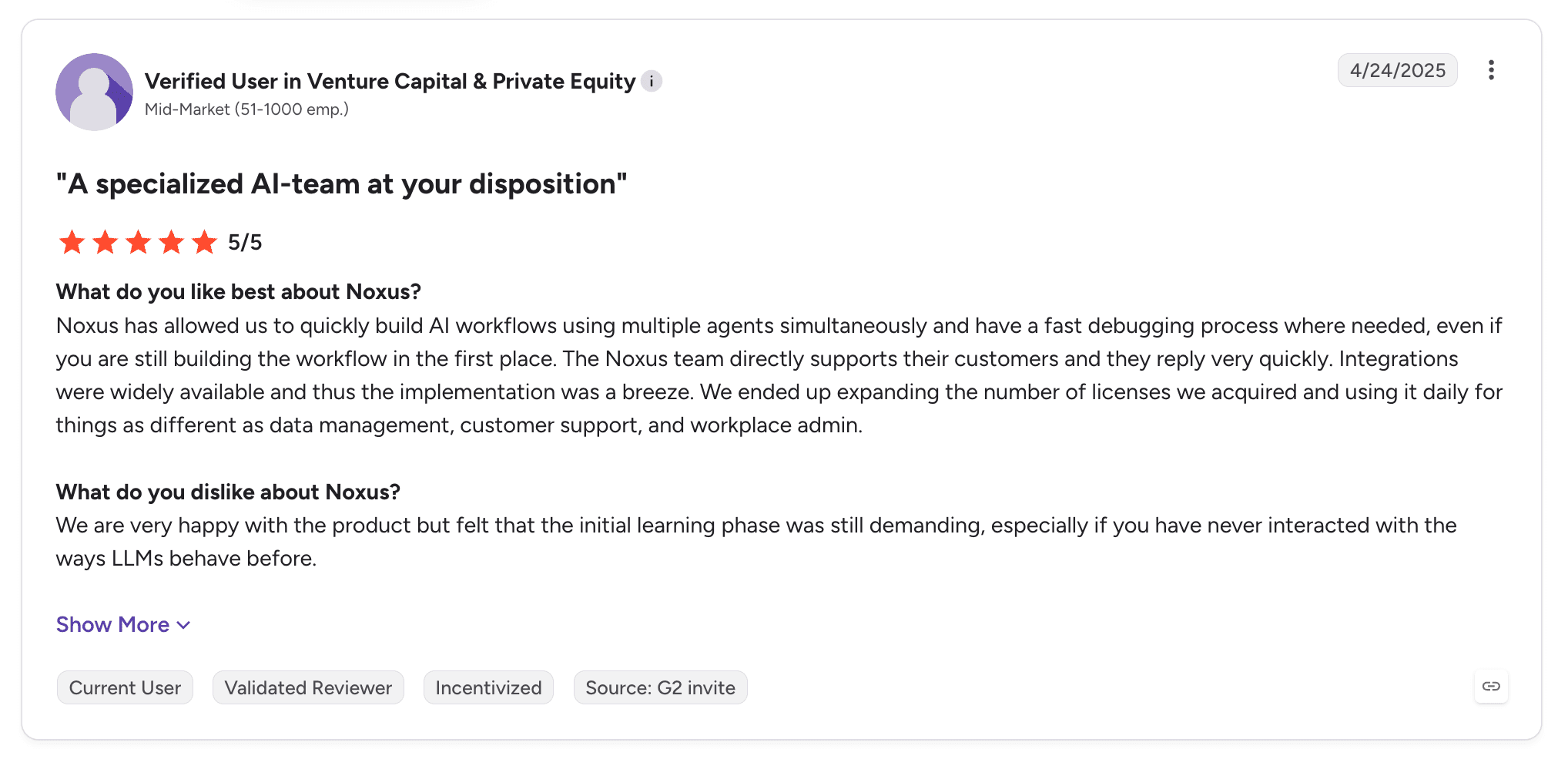
Noxus holds 5.0 out of 5 across three G2 reviews, which is early signal rather than a large sample. Reviewer tags highlight setup ease, integrations and customer support, with learning curve the only negative.
Reviewers describe widely available integrations that made implementation straightforward, fast debugging and a team that supports customers directly. The one criticism is a demanding initial learning phase for teams new to how LLMs behave.
Final Verdict
For ERP processes that begin in documents and emails and must end in a correct ERP record, Noxus is the strongest option here. It holds each case until the ERP is right, and it does so on ERPs other vendors need an API project to reach.
Organisations running SAP on-premises, or weighing whether to stay on ECC, get automation that works on the estate they have today.
2. UiPath

Overview
UiPath is one of the largest automation vendors and a long-standing choice for ERP-facing RPA. Its robots operate SAP GUI, Oracle Forms and other ERP screens, and its API automation, agents and document understanding cover the rest.
UiPath Agentic Automation now adds AI agents, human-in-the-loop tasks and Maestro orchestration for longer processes. It runs as cloud or in customer-managed infrastructure.
For ERP work, its reach into screens that have no API has made it a default in many finance shared services centres.
Ideal For
Finance shared services centres with an existing UiPath estate
ERP environments where key transactions have no usable API
Centres of excellence governing many ERP automations
Teams combining document understanding with ERP posting
Top Features
SAP and ERP UI automation. Robots operate ERP transactions directly, which reaches screens no integration covers.
Document understanding. Extracts invoice and order data for posting.
Agents with human review. Handle judgement steps with people approving where needed.
Orchestrator and Maestro. Govern robots, queues and longer processes centrally.
Why They Stand Out
UiPath is one of the strongest choices for organisations extending ERP automation they already run. Reviewers highlight breadth across SAP, mainframe, Windows, web and PDF applications.
Its community and free training make ERP automation skills easier to find and keep.
Pros
Automates SAP GUI, Oracle and other ERP screens without APIs
Document understanding for invoices and orders
Agents and human-in-the-loop in the same estate
Mature governance for large automation estates
Large practitioner community and training
Cons
UI-based ERP automations need maintenance when transactions change
Setup often needs expert help
Learning curve for advanced features
Licensing is intricate
Case state across long ERP processes can spread across queues and apps
Customer Reviews
UiPath Agentic Automation holds 4.6 out of 5 across 7,661 G2 reviews, and UiPath holds 4.6 out of 5 across 723 Capterra reviews.
Reviewers praise ease of use, flexibility and extending RPA with agentic decision-making, and several point to automation across SAP, mainframe and PDF applications.
The criticisms concentrate on setup that needs an expert, a learning curve and pricing complexity, with some reviewers describing harder debugging once agentic and rule-based steps mix.

Final Verdict
UiPath suits finance and supply chain teams with an established automation estate and ERP transactions that only a screen can reach.
For ERP processes that need AI-read documents, long-running case state and write-back through supported interfaces, weigh the maintenance cost of screen-level automation against a process-first approach.
3. Celonis

Overview
Celonis is the best-known process mining company, and ERP data is its home ground. It reads event logs from SAP, Oracle and other ERPs to show how order-to-cash, procure-to-pay and other processes run in practice.
Headquartered in Munich and New York, Celonis now pairs mining with Action Flows, Process Orchestration and AgentC, so teams can trigger actions and coordinate process sequences from what the data shows.
For ERP automation, it is most often the tool that decides where to automate and proves whether it worked.
Ideal For
Finance and supply chain improvement teams building a case for automation from ERP data
SAP-heavy organisations with data engineering capacity
Teams tracking working capital, on-time payment and rework KPIs
Organisations running continuous improvement programmes on ERP processes
Top Features
ERP process mining. Rebuilds processes from ERP event data, showing variants and rework.
Process Intelligence Graph. A shared model of objects and events across systems.
Action Flows and orchestration. Trigger actions and sequence work based on process data.
Prebuilt ERP content. Apps and KPIs for common ERP processes.
Why They Stand Out
Celonis is one of the smartest choices for seeing where ERP processes break before automating them. Reviewers describe turning process data into clear, actionable insights.
Its SAP connectors are deep, and its KPIs let finance teams track improvement in terms they already report.
Pros
Shows real ERP process flows from event data
Deep SAP and Oracle connectors
Prebuilt apps for procure-to-pay and order-to-cash
Action and orchestration features on top of process data
Measures improvement over time
Cons
Learning curve and complex setup
Value depends on data quality and extraction effort
Individual case execution usually relies on other tools
Reviewers mention slow performance on large data sets
Customer Reviews
Celonis holds 4.5 out of 5 across 322 G2 reviews and 4.6 out of 5 across 5 Capterra reviews.
Reviewers praise process visibility, insight into inefficiencies and the ability to act on what the data shows. Several describe building a digital twin of their operations.
The criticisms focus on the learning curve, complexity, missing features and performance on large volumes of data.

Final Verdict
Celonis suits ERP-heavy organisations that want evidence of where processes break and a way to track improvement.
It pairs naturally with a tool that runs each case, because mining shows the invoice that stalled while execution fixes it and posts the result.
4. SAP Build

Overview
SAP Build is SAP's low-code family for extending its own applications. It includes SAP Build Process Automation for workflows and bots, SAP Build Apps for interfaces and SAP Build Code for pro-code development, all on SAP Business Technology Platform.
Joule, SAP's AI assistant, adds generative AI to building and running automations. Prebuilt content covers common SAP scenarios such as purchase requisition approvals and sales order management.
For SAP customers, it is the vendor-native option, with integration into S/4HANA and SAP cloud applications out of the box.
Ideal For
SAP customers on S/4HANA and SAP BTP
Business users building approval workflows on SAP data
SAP centres of excellence extending standard processes without modifying the core
Organisations following SAP's clean-core guidance
Top Features
SAP Build Process Automation. Workflows, forms and bots for SAP processes.
Prebuilt SAP content. Ready-made packages for common SAP scenarios.
Joule and AI. Generative AI for building and assisting automations.
SAP integration. Native connectivity to S/4HANA and SAP cloud applications.
Why They Stand Out
SAP Build is one of the strongest choices for keeping SAP extensions inside SAP's own stack. It fits the clean-core approach and uses SAP's security and identity model.
Reviewers highlight time saved, low-code development and smooth SAP integrations.
Pros
Native integration with S/4HANA and SAP cloud applications
Prebuilt workflows for common SAP processes
Business users can build approvals with low-code
Fits SAP clean-core guidance
Uses SAP identity and security
Cons
Limited reach into non-SAP systems
Customisation limits for complex scenarios
Reviewers mention slow performance in places
Falls short for developers who need full control
Best suited to SAP cloud estates
Customer Reviews
SAP Build holds 4.2 out of 5 across 142 G2 reviews and 4.3 out of 5 across 9 Capterra reviews.
Reviewers praise ease of use, low-code app development and integration with SAP systems, with approval workflows mentioned often.
The criticisms focus on limited features and customisation, integration issues outside SAP, slow performance and a learning curve for advanced scenarios.

Final Verdict
SAP Build suits SAP customers extending S/4HANA with approvals and simple automations on SAP's own stack.
Processes that cross SAP and non-SAP systems, or depend on on-premises ECC, will need more than SAP Build provides alone. Our best SAP automation software guide compares SAP-specific options in more depth.
5. Automation Anywhere

Overview
Automation Anywhere combines RPA, AI agents and document automation in a cloud-native product it calls agentic process automation. Finance teams use it heavily for invoice processing, reconciliation and ERP data entry.
Headquartered in San Jose, it moved its core product to the cloud, which reduced the infrastructure overhead of running large bot estates.
Its ERP story rests on document automation feeding bots and agents that post into ERP systems.
Ideal For
Finance teams automating invoices, reconciliations and ERP data entry
Enterprises modernising RPA programmes with agents
Organisations preferring a cloud-native control room
Teams automating across web apps, APIs and Excel
Top Features
Document Automation. Extracts invoice and order data for ERP posting.
Agentic process automation. Agents handle judgement steps inside automations.
AARI. People review and approve work inside automations.
Cloud control room. Central management without on-premises servers.
Why They Stand Out
Automation Anywhere is one of the smartest choices for document-heavy ERP work in an RPA-led programme. Reviewers describe connecting and automating multi-step workflows across applications.
Its web, API and Excel coverage suits the spreadsheets that often sit between documents and the ERP.
Pros
Strong document automation for finance workloads
Cloud-native control room
Clear path from RPA to agents
Human-in-the-loop through AARI
Coverage across web, API and Excel
Cons
Steep learning curve
Reviewers report bugs and bot issues
Cost at scale
Troubleshooting complex workflows takes time
Long-running case state needs extra configuration
Customer Reviews
Automation Anywhere Agentic Process Automation holds 4.5 out of 5 across 5,665 G2 reviews, and Automation Anywhere holds 4.4 out of 5 across 195 Capterra reviews.
Reviewers praise automation of repetitive tasks, ease of use and time saved, and several describe connecting multi-step workflows across applications.
The criticisms centre on a steep learning curve, expense, missing features and bot reliability.

Final Verdict
Automation Anywhere suits finance teams running RPA programmes with heavy document intake into the ERP.
For ERP processes where state must survive days of exceptions and approvals across several systems, plan for more configuration than in a process-first tool.
6. RunMyJobs by Redwood

Overview
RunMyJobs by Redwood is a SaaS workload automation product built around ERP job scheduling. It orchestrates batch jobs, file transfers and dependencies across SAP, Oracle and other enterprise systems.
Redwood has worked closely with SAP for years, and RunMyJobs is named a Leader in Gartner's Magic Quadrant for Service Orchestration and Automation Platforms for the third year running in 2026.
Its focus is making sure the ERP's scheduled work runs on time, in order and with visibility, particularly around financial close and supply chain planning.
Ideal For
SAP Basis and operations teams replacing legacy job schedulers
Finance teams orchestrating period-end close tasks
Organisations moving ERP workloads to the cloud
IT operations teams needing SLA monitoring for batch work
Top Features
SAP job scheduling. Deep integration with SAP job execution and monitoring.
Cross-system orchestration. Dependencies across ERP, data and cloud systems.
Managed file transfer. Secure movement of files between systems.
SLA monitoring. Predicts and alerts on late-running jobs.
Why They Stand Out
RunMyJobs is one of the strongest choices for orchestrating ERP batch workloads. Reviewers consistently praise reliability and visibility into SAP job scheduling.
Its SaaS delivery removes the maintenance overhead of on-premises schedulers, which suits ERP cloud migrations.
Pros
Deep SAP job scheduling integration
High reliability for business-critical batch work
SaaS delivery with low maintenance
Clear visibility and SLA alerting
Strong fit for financial close orchestration
Cons
Learning curve for new team members
Interface could be more intuitive, according to reviewers
Focused on scheduled jobs rather than document-driven cases
Less suited to processes that need AI interpretation or human review
Customer Reviews
RunMyJobs holds 4.8 out of 5 across 312 G2 reviews, and Redwood RunMyJobs holds 4.8 out of 5 across 35 Capterra reviews. Those are the highest ratings on this list.
Reviewers praise reliable automation, clear visibility and less manual work in SAP job scheduling, with several describing more predictable operations.
The criticisms focus on a learning curve for beginners and an interface some reviewers want improved.

Final Verdict
RunMyJobs suits ERP operations teams that need scheduled workloads to run reliably across SAP and connected systems.
It complements case-level process automation, because batch orchestration and document-driven cases are separate jobs.
7. Workato

Overview
Workato is an integration and automation product used to connect ERPs with the rest of the business. Teams build recipes that move data and trigger actions between NetSuite, SAP, Oracle, Workday, Salesforce and hundreds of SaaS applications.
It now pitches itself as the place to govern and scale enterprise AI, adding agentic capabilities, API management and governance on top of its integration core.
For ERP work, it is strongest where the ERP is cloud-based and the process is mostly data flowing between applications.
Ideal For
Organisations running cloud ERPs such as NetSuite alongside many SaaS apps
Business technology teams building integrations without heavy development
Finance operations automating quote-to-cash and order sync
IT teams centralising integration governance
Top Features
Recipes. Low-code integration and automation logic between applications.
Large connector library. Pre-built connectors for ERP, CRM, HR and finance systems.
API management. Publish and govern APIs from the same product.
Agentic automation. AI agents working inside integration workflows.
Why They Stand Out
Workato is one of the strongest choices for connecting a cloud ERP to the SaaS applications around it. Reviewers describe building integrations quickly with strong support.
Its governance features suit organisations moving integration work from IT backlogs to business technology teams.
Pros
Fast integration building with low-code recipes
Broad connectors across ERP and SaaS
Strong customer support, according to reviewers
API management in the same product
Central governance for integrations
Cons
Learning curve for complex recipes
Complexity grows at scale
Reviewers mention data volume limits and missing features
Less suited to on-premises ERPs without APIs
Document-heavy, exception-heavy cases need other tools
Customer Reviews
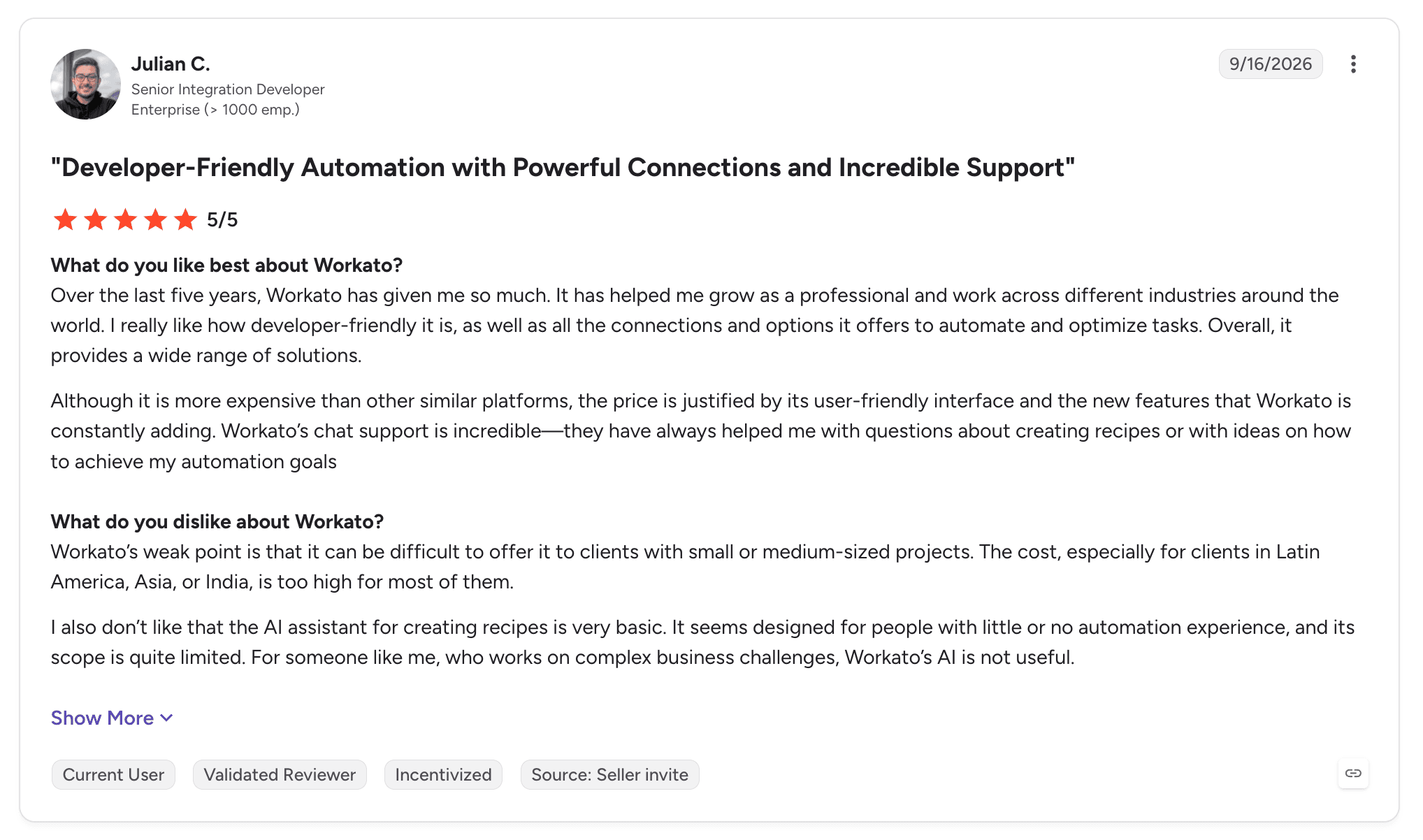
Workato holds 4.7 out of 5 across 792 G2 reviews and 4.6 out of 5 across 86 Capterra reviews.
Reviewers praise ease of use, the breadth of integrations and support, with several describing complex integrations built far faster than custom code.
The criticisms focus on the learning curve, missing features, complexity and data limitations.
Final Verdict
Workato suits organisations connecting a cloud ERP to many SaaS applications with governed, low-code integrations.
Where the ERP is on-premises, or the process depends on reading documents and resolving exceptions, integration alone leaves the case work to people.
8. Boomi

Overview
Boomi is an integration product that connects ERPs with CRM, HR, data and cloud systems. Its Enterprise Platform covers integration, API management, a master data hub and Agentstudio for AI agents.
Boomi has a long history in low-code integration and is common in mid-market and enterprise organisations running NetSuite, SAP and Oracle.
Its ERP role is moving data reliably between the ERP and the systems around it.
Ideal For
Organisations integrating NetSuite, SAP or Oracle with CRM and HR systems
IT teams wanting low-code integration with a large community
Companies managing master data across several systems
Teams building APIs around their ERP
Top Features
Low-code integration. Visual integration building with prebuilt connectors.
API management. Design, publish and secure APIs.
Master data hub. Keep customer, product and supplier data consistent.
Agentstudio. Build and govern AI agents that use integrations.
Why They Stand Out
Boomi is one of the smartest choices for low-code integration around an ERP. Reviewers describe smooth NetSuite integration and fast automation.
Its master data capabilities help keep supplier and customer records consistent between the ERP and other systems.
Pros
Low-code integration with prebuilt ERP connectors
Strong NetSuite, SAP and Oracle connectivity
Master data management included
Active community and learning resources
API management in the same product
Cons
Troubleshooting and error handling are hard, according to reviewers
Reporting is limited
Support response times draw criticism
Case work with documents and exceptions sits outside its scope
Customer Reviews
Boomi holds 4.4 out of 5 across 505 G2 reviews and 4.4 out of 5 across 274 Capterra reviews.
Reviewers praise ease of use, low-code capabilities and connectors, with NetSuite integration mentioned often.
The criticisms focus on troubleshooting difficulty, limited reporting and support response times.

Final Verdict
Boomi suits organisations that need reliable, low-code integration between an ERP and the systems around it.
For processes where someone still has to read the invoice and resolve the mismatch, pair integration with case-level automation.
9. Tungsten Automation

Overview
Tungsten Automation, formerly Kofax, is known for document capture and accounts payable automation. Its TotalAgility product combines intelligent document processing, OCR, process orchestration and low-code design.
Kofax built its reputation in capture and AP, and many finance teams still know TotalAgility as Kofax KTA. The rebrand to Tungsten Automation came in 2024.
For ERP work, it reads invoices and documents and routes them into ERP workflows.
Ideal For
Accounts payable teams processing high invoice volumes
Organisations with paper and scanned documents feeding the ERP
Shared services centres digitising mailrooms
Finance teams wanting capture and workflow in one product
Top Features
Intelligent document processing. Classifies and extracts data from invoices and forms.
OCR. Converts scanned and paper documents into structured data.
Process orchestration. Low-code workflows around captured documents.
AP automation. Invoice capture, validation and routing into ERP.
Why They Stand Out
Tungsten Automation is one of the strongest choices for document-heavy ERP intake. Reviewers praise how it automates complex document processes with capture and workflow together.
Its AP heritage means prebuilt handling for invoice formats and validation rules.
Pros
Strong document capture and OCR
Low-code process design around documents
Long accounts payable heritage
Integration with major ERPs
Handles scanned and paper intake
Cons
Interface feels dated, according to reviewers
Implementations are complex and often consultant-led
Handwriting recognition has limits
Less suited to processes beyond document intake
Customer Reviews
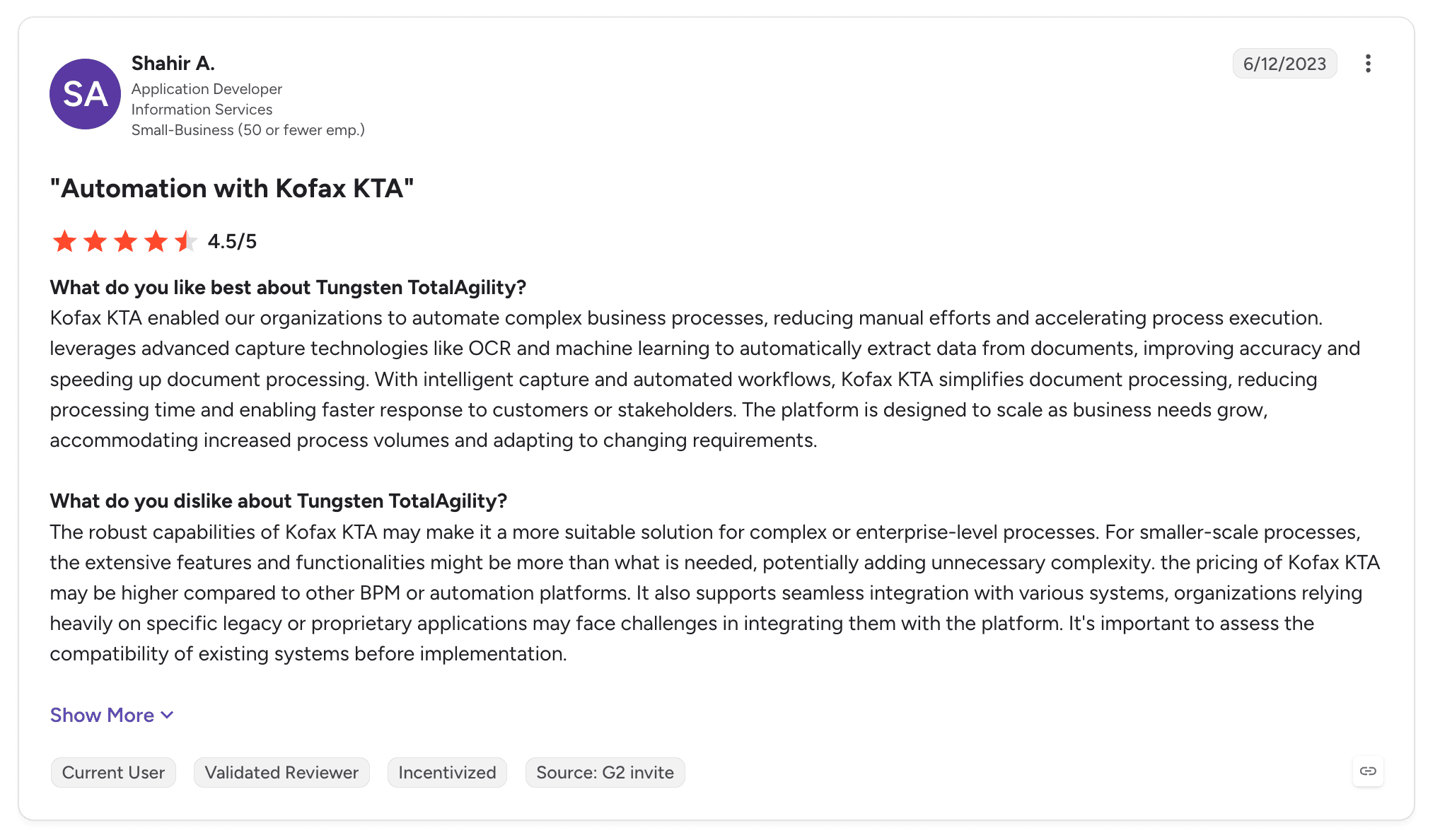
Tungsten TotalAgility holds 4.3 out of 5 across 55 G2 reviews. It has no Capterra listing under its current name.
Reviewers praise ease of use, integration capabilities and comprehensive document processing, with several crediting consultants for meeting project requirements.
The criticisms focus on the interface, implementation complexity and OCR limits with handwritten documents.
Final Verdict
Tungsten Automation suits AP and shared services teams where document capture is the main bottleneck before the ERP.
When the process continues well past capture, through exceptions, approvals and write-back across several systems, it covers the front of the process more than the whole.
10. Microsoft Power Automate

Overview
Microsoft Power Automate automates tasks across Microsoft 365, Dynamics 365 and connected systems. Cloud flows use connectors, and desktop flows automate ERP screens that expose no API.
For organisations on Dynamics 365 Finance and Operations or Business Central, it is often the default automation tool. It also has connectors for SAP and other ERPs.
Its ERP role is automating known sequences, such as approvals and data movement, around the ERP.
Ideal For
Organisations on Dynamics 365 ERP
Microsoft 365 teams automating ERP-related approvals
Desktop automation of ERP screens without APIs
Citizen developers under Microsoft governance
Top Features
ERP connectors. Dynamics 365, SAP and other ERP connectors.
Desktop flows. UI automation for ERP screens.
Approvals. Decisions routed through Teams and Outlook.
Process mining. Identify where ERP-related work stalls.
Why They Stand Out
Power Automate is one of the most accessible choices for Microsoft-centred ERP estates. Licensing and identity are already in place for most Microsoft customers.
Reviewers describe efficient, easy-to-implement automation.
Pros
Close integration with Dynamics 365 and Microsoft 365
Desktop flows reach ERP screens without APIs
Approvals built into Teams and Outlook
Accessible to business users
Process mining included
Cons
Complex flows are hard to debug
Performance slows on larger flows
Long-running ERP cases spread state across flows and apps
More effort for non-Microsoft ERPs
Customer Reviews
Microsoft Power Automate holds 4.4 out of 5 across 1,092 G2 reviews and 4.4 out of 5 across 239 Capterra reviews.
Reviewers praise ease of use, drag-and-drop design and Microsoft integration, with several using it for repetitive data work.
The criticisms centre on debugging complex flows, vague errors and performance.

Final Verdict
Power Automate suits Dynamics 365 customers and Microsoft-centred teams automating known ERP-adjacent tasks.
For SAP or Oracle processes with heavy document intake and exceptions, it tends to become one component among several. For lighter no-code options, see our guide to the best no-code workflow automation software.
How to Choose the Best ERP Automation Tools (What To Consider)?
ERP automation succeeds or fails on one question: is the ERP record correct at the end, without someone fixing it by hand? These six factors help you test that before you buy.
1. Map Which Layer the Tool Touches
ERP automation platforms connect at different layers: the screen, the API, the database, the documents feeding the ERP or the process around it.
Screen automation reaches anything but breaks when transactions change. API and integration tools are stable but need APIs, and process-level tools coordinate the others. Know which layer each shortlisted tool works at before comparing features.
2. Insist on Write-Back
Extraction without posting only moves the manual step. Ask each vendor to show a document arriving and the resulting ERP record updated, whether that is an invoice, a goods receipt or an inspection lot.
Check how the write-back is governed. Permissions, credentials and approval rules should follow your ERP controls.
3. Test Real Mismatches
Exceptions carry most of the cost. A small share of invoices with price or quantity variances can absorb most of the finance team's time.
Bring real mismatches to the evaluation. The tool should pause the case, assemble the document, extracted data and ERP context, route it to the right person and resume once resolved.
4. Check It Works on the ERP You Have
Many organisations will run ECC for years, and many ERPs expose no modern API. The software has to work on your current estate as well as the one planned after migration.
Ask how the tool reaches on-premises SAP or a proprietary ERP. Options such as an agent placed next to the database avoid an API project before the first case runs.
5. Settle Deployment Next to the ERP
ERP data is sensitive, and many finance teams need automation to run where the ERP runs. Check support for self-hosted, hybrid and on-premises deployment, and where documents and audit records are stored.
Bring IT, security and ERP owners into the evaluation early. Their requirements on network, identity and data residency narrow the shortlist quickly.
6. Design the Process Before Automating It
Automating a broken ERP process makes it fail faster. Map how work runs today, including the spreadsheets and emails around the ERP, and decide which steps agents, rules, people and the ERP should own.
Our guide to the best workflow design tools covers how the leading options model processes before they run.
Everything You Need to Know About ERP Automation Tools
Company | Pros | Cons | Ease of Use | Integrations | Support | ERP Write-Back | Deployment Control |
Noxus | Writes into ERPs without modern APIs; exceptions routed with ERP context; deploys next to the ERP | Sales-led evaluation; operational focus; small public review base | ⭐⭐⭐⭐ | ⭐⭐⭐⭐⭐ | ⭐⭐⭐⭐⭐ | ⭐⭐⭐⭐⭐ | ⭐⭐⭐⭐⭐ |
UiPath | Reaches ERP screens; document understanding; mature governance | Screen maintenance; expert setup; intricate licensing | ⭐⭐⭐⭐ | ⭐⭐⭐⭐⭐ | ⭐⭐⭐⭐ | ⭐⭐⭐⭐ | ⭐⭐⭐⭐ |
Celonis | ERP process visibility; deep SAP connectors; improvement tracking | Learning curve; data effort; relies on other tools to execute | ⭐⭐⭐ | ⭐⭐⭐⭐ | ⭐⭐⭐⭐ | ⭐⭐ | ⭐⭐⭐ |
SAP Build | Native SAP integration; prebuilt SAP content; clean-core fit | Limited outside SAP; customisation limits; performance | ⭐⭐⭐⭐ | ⭐⭐⭐ | ⭐⭐⭐⭐ | ⭐⭐⭐⭐ | ⭐⭐⭐ |
Automation Anywhere | Document automation; cloud control room; RPA to agents | Learning curve; bot issues; cost | ⭐⭐⭐⭐ | ⭐⭐⭐⭐ | ⭐⭐⭐⭐ | ⭐⭐⭐ | ⭐⭐⭐ |
RunMyJobs by Redwood | SAP job scheduling; reliability; visibility | Learning curve; interface; scheduling scope | ⭐⭐⭐⭐ | ⭐⭐⭐⭐ | ⭐⭐⭐⭐⭐ | ⭐⭐⭐ | ⭐⭐⭐⭐ |
Workato | Fast integrations; broad connectors; strong support | Learning curve; complexity; data limits | ⭐⭐⭐⭐ | ⭐⭐⭐⭐⭐ | ⭐⭐⭐⭐⭐ | ⭐⭐⭐ | ⭐⭐⭐ |
Boomi | Low-code integration; NetSuite and SAP connectors; master data | Hard troubleshooting; limited reporting; support times | ⭐⭐⭐⭐ | ⭐⭐⭐⭐⭐ | ⭐⭐⭐ | ⭐⭐⭐ | ⭐⭐⭐ |
Tungsten Automation | Document capture; AP heritage; low-code workflow | Dated interface; complex implementations; handwriting limits | ⭐⭐⭐ | ⭐⭐⭐⭐ | ⭐⭐⭐⭐ | ⭐⭐⭐ | ⭐⭐⭐⭐ |
Microsoft Power Automate | Dynamics 365 fit; desktop flows; accessible | Hard to debug; state spread across tools; weaker outside Microsoft | ⭐⭐⭐⭐⭐ | ⭐⭐⭐⭐ | ⭐⭐⭐ | ⭐⭐⭐ | ⭐⭐⭐ |
Automate Your ERP Processes End to End with Noxus
Noxus runs the process around your ERP and keeps the ERP as the record. Invoices, certificates and requests are read by agents, tolerances and approval limits stay deterministic, mismatches reach the right team with context, and outcomes are written back into SAP, Oracle or your proprietary ERP.
It works on the estate you have today, including on-premises SAP ECC without modern APIs, and it runs self-hosted, hybrid or on-premises with bring-your-own-key encryption and no training on your data. If the relationship ends, you keep all code and binaries.
Carlsberg Group reconciles supplier invoices against purchase orders and delivery records with only the exceptions reaching finance. KIRCHHOFF Automotive connects production operations directly to SAP through OData, from intake to write-back.
Book a demo with Noxus and bring the ERP process your finance or operations team still reconciles by hand.
FAQs About ERP Automation Tools
What are ERP automation tools used for?
ERP automation tools are used for running the processes that create, match and update ERP records without manual data entry. Common examples are invoice processing, three-way matching, supplier onboarding, order management, quality notifications and period-end close. The stronger tools read documents with AI, apply ERP rules, route exceptions to people and write the outcome back into SAP, Oracle or NetSuite.
What are the best ERP automation tools in 2026?
Noxus leads the best ERP automation tools in 2026 for processes that start in documents and emails and must finish in a correct ERP record. It writes back into SAP ECC, S/4HANA, Oracle and proprietary ERPs, including on-premises systems without modern APIs, and routes mismatches with full context. Celonis suits ERP process analysis, RunMyJobs suits batch scheduling, and Workato and Boomi suit cloud ERP integration.
What should I consider when choosing the right ERP automation software for me?
When choosing ERP automation software, consider which layer the tool connects at, whether it writes back into the ERP and how it handles real mismatches. Confirm it works on your current ERP version, including on-premises systems, and settle deployment and data residency with IT early. Then test the shortlist on live documents and exceptions from your own process.
What features should I look for in ERP automation platforms?
The features to look for in ERP automation platforms are AI document reading, deterministic rules for tolerances and approvals, governed write-back into the ERP and exception routing with full context. Add a persistent case record, audit export and deployment next to the ERP. For SAP estates, check OData integration and support for ECC as well as S/4HANA.
How does Noxus differ from similar alternatives?
Noxus differs from similar alternatives by running the whole process around the ERP. RPA tools automate ERP screens, integration tools move data, schedulers run batch jobs and process mining analyses flows. Noxus holds each case from intake to ERP write-back, combines agents with deterministic rules and deploys next to the ERP, including on-premises SAP without modern APIs.
How do I get started with Noxus?
You get started with Noxus by picking one high-volume ERP process with a clear outcome, such as invoice reconciliation or supplier document processing. Noxus maps how it runs today, quantifies the value and designs it for AI execution with human oversight. The process is then proven on your live ERP within weeks against criteria set upfront, with the engagement model targeting 30 days from process to production.
How easy is it to switch to Noxus?
Switching to Noxus is usually one process at a time, alongside the bots, integrations and schedulers you already run. Existing automations can stay in place while Noxus takes over the case around them, and the current process map, rules and exception paths carry over directly. Noxus deployments have reached production in 45 to 80 days on client systems.
Do we need to migrate to S/4HANA before automating ERP processes?
You do not need to migrate to S/4HANA before automating ERP processes with Noxus. It works with SAP ECC and S/4HANA alike, through OData integration or an agent placed next to on-premises SAP, so automation can start on the system you run today. When a migration happens, the process definition stays the same and only the connection to SAP changes.






