Best Appian Alternatives in 2026 (Top-Rated Competitors Compared)
Noxus is the strongest Appian alternative for enterprises that want to run AI-assisted operations across their existing systems without building an application around every process. Process Builder defines the work, each Case keeps its state and history, and Work Queues bring cases and exceptions to the people who own them.

Appian is a mature process suite, and most teams that look elsewhere already know what it does well. They leave because of licensing cost, the specialist skills needed for advanced work, or because the next process they need to run is an operation more than an application.
This guide compares nine enterprise alternatives to Appian on the same criteria. The comparison is based on verified G2 and Capterra reviews and a detailed analysis of each tool in October 2026.
Key Takeaways (TL;DR)
Who Appian Is For: Large enterprises and public bodies building process applications with case management, where low-code delivery, data fabric and long-running cases with human tasks justify the licence and the developer skills.
Why Seek an Appian Alternative: Licensing cost comes up in most critical reviews, followed by the learning curve of its expression language, debugging effort and limits on interface customisation. Some teams also want a lighter way to put AI to work on an operation without building and maintaining a full application.
Best Overall Alternative: Noxus, for operations where Agents, exact rules, people and existing systems work on the same case. The process is defined in Process Builder, runs as Cases and surfaces human work in Work Queues.
What Sets Noxus Apart: Noxus brings process orchestration, agent execution and control over deployment and model access together around the operation itself, so the business case covers the process without a new application to build and maintain.
How to Choose: Decide whether you are extending an existing Appian estate or starting a new operation. Then compare how each option handles a case through a wait, an exception and a versioned change, and agree deployment and model access with IT before the demos.
Top Appian Alternatives in 2026 at a Glance
Tool | Best For | Key Features | Pros | Cons |
Noxus | Operations where Agents, exact rules, people and existing systems work on the same case | Process Builder, Cases, Work Queues, Agents and Flows, versioned releases, managed cloud or customer-controlled deployment | Case state through waits and exceptions; existing systems keep their records; model access separate from the process | Not a general low-code app builder; evaluation starts with a scoped process; processes defined in Process Builder, outside BPMN |
Pega | Large enterprises with complex, rules-heavy case work | Case management, decisioning, Pega GenAI Blueprint, workflow automation | Deep case and rules modelling; decisioning across channels; regulated-industry record | Steep learning curve; certified developers; long implementations |
Camunda | Engineering teams standardising on BPMN orchestration | BPMN and DMN modelling, Zeebe engine, agentic orchestration, connectors, Optimize | Open standards; developer control; scales for high-volume orchestration | Needs developers; front-end and task UIs built separately; licensing for enterprise features |
OutSystems | Enterprises building custom applications quickly with low-code | Visual development, AI agent building, reusable components, cloud, on-premises or hybrid deployment | Fast application delivery; strong for complex apps; flexible deployment | Pricing structure; learning curve beyond basics; vendor-specific skills |
Mendix | Enterprises with business and IT teams co-building apps | Model-driven development, Studio Pro, workflows, Siemens integration, cloud or private deployment | Collaboration between business and IT; reusable components; deployment choice | Debugging large apps; cost at scale; learning curve for advanced logic |
Microsoft Power Apps | Microsoft 365 organisations building internal apps | Canvas and model-driven apps, Dataverse, Copilot, Power Automate integration | Fits Microsoft 365; fast for simple apps; large community | Licensing complexity; performance with large data; limits for complex apps |
ServiceNow App Engine | ServiceNow customers building apps on the same data and governance | App Engine Studio, Flow Designer, Integration Hub, AI agents | Shared ServiceNow data and governance; low-code delivery; integrations | Cost; customisation complexity; strongest inside ServiceNow |
UiPath | Organisations extending an automation estate with orchestration and case management | Robots, agents, Maestro with BPMN modelling, case management, Orchestrator | Reaches applications with no API; broad automation suite; mature governance | Setup needs specialist skills; screen automations need upkeep; licensing planning |
Bizagi | Process teams that start with BPMN modelling | Bizagi Modeler, Studio, process automation, low-code forms, cloud deployment | Free BPMN modeller; business-friendly design; quick to model | Performance with complex processes; customisation limits; upgrade rework |
IBM Business Automation Workflow | IBM customers running BPM and case management on their own infrastructure | Process and case management, decisions, content, Cloud Pak for Business Automation | Mature BPM and case management; on-premises and OpenShift deployment; IBM estate fit | Complex installation; dated interface; specialist skills |
Why Consider Appian Alternatives?
What Appian Does Well
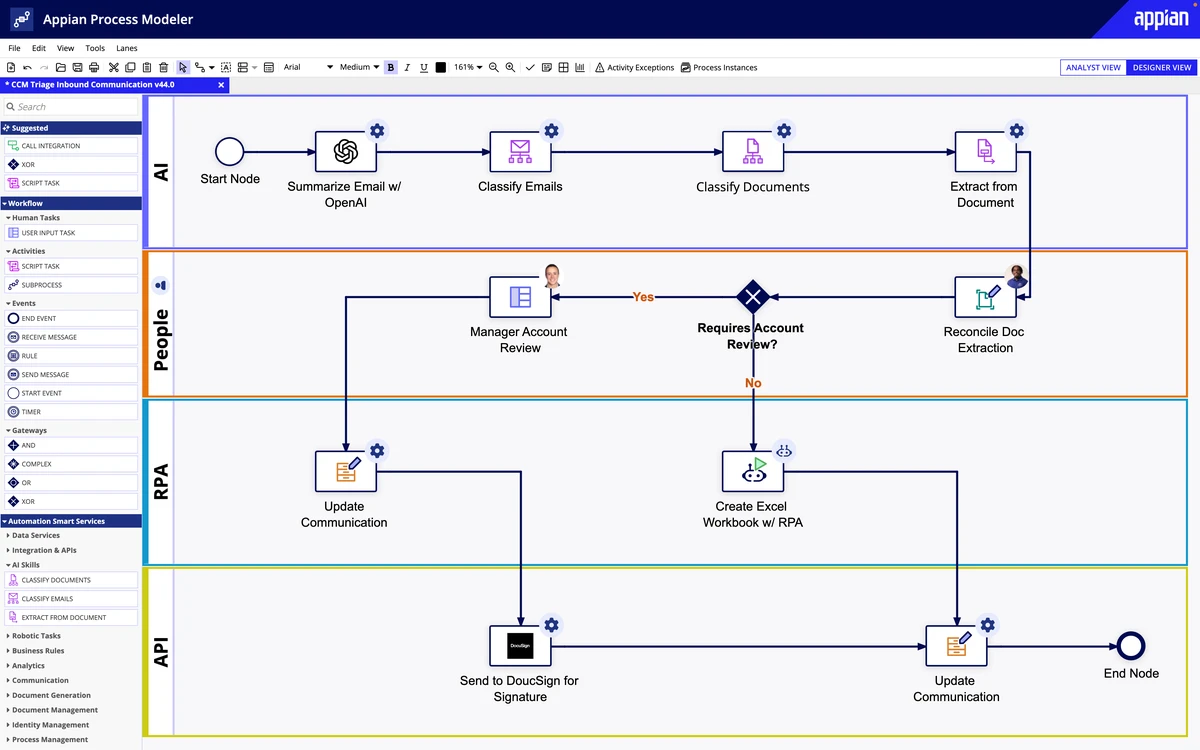
Appian is an enterprise process suite that embeds AI agents in business workflows. Its process models coordinate agents, human tasks, business rules, RPA and enterprise systems, and agents take part in long-running processes with shared state and a person responsible for each decision.
It holds a 4.4 average across nearly 600 verified user reviews, with ease of use, automation, low-code development and AI the strengths users name most often.
Reviewers describe applications that grow without changing tools. A development team lead explains how a simple form can grow into a full enterprise application with orchestration, AI and integrations in one environment. Another reviewer replaced a fragile spreadsheet pipeline with a maintainable end-to-end app that client users picked up with almost no training.
Data fabric is the second strength. It connects data from several systems into one model, so a process application can read and update records across sources without a separate integration layer.
For an organisation with an established Appian estate and trained developers, extending it is often the sensible choice. Existing process models, interfaces and internal expertise all count in that assessment.
Where Appian Falls Short
The limitations users name cluster around cost, flexibility and debugging. Licensing comes up most often, with reviewers describing per-user pricing that does not scale for mid-sized clients and no clear cost bracket as teams grow.
Technical users describe vague error messages, the lack of a step-through debugger and slower performance with complex interfaces. The expression language takes time to master, styling options are limited, and data fabric relationships need specialised training.
One architect adds that clients dislike paying licences in periods when they are not building new apps, and that new features take time to arrive.
The structural question is what the team wants to build. Appian is a broad low-code process and application suite, so a new process often comes with an application to design, interfaces to build and code to maintain.
That suits a case management application used for years. It is a heavier route when the goal is to put AI to work on an operation, such as supplier documents or customer complaints, where most of the work happens between existing systems.
Best Appian Alternative Overall

Noxus is the best overall Appian alternative for enterprises running operations where Agents, exact rules, people and existing systems work on the same case. We assessed every tool on this list against the same criteria: case handling through waits and exceptions, human work, system updates, change control and deployment.
Noxus scores highest on those criteria for AI-assisted operations. Process Builder defines the activities and who or what performs each one, Cases retain the state and history of every request, and Work Queues bring the active work to the people responsible for it.
Cases, workflows and human tasks are not unique to Noxus, and Appian handles all three. The difference is where each product is centred: Appian is a broad process and application suite, while Noxus is focused on redesigning and running business processes in which Agents, deterministic logic, people and existing systems take part in the same execution model.
KIRCHHOFF Automotive shows what that looks like in practice. Noxus classifies incoming supplier-quality documents, verifies the supplier, applies the quality team's validation rules and writes passing documents into SAP S/4HANA, attached to the right goods receipt. Failed checks go to a person with the context attached.
Best Appian Alternatives in 2026: In-Depth Review & Comparison
The best Appian alternatives fall into four groups: a process layer for AI-assisted operations, BPM and case management suites, low-code application builders, and automation suites with orchestration.
Each entry follows the same structure: what the product does, who it fits, its strongest capabilities, why it is a credible alternative to Appian, what users say and where it stops. Ratings and review themes come from G2 and Capterra as of October 2026.
1. Noxus

Overview
Noxus helps organisations redesign and run complex business processes across agents, people and the systems they already depend on. Its Process Intelligence product holds the logic of each process, the live state of every case and the history of how the work was completed.
Founded in 2024 and based in London and Lisbon, Noxus competes in the same category of enterprise process tools as Appian and Camunda. Its focus is the operation: what AI will execute, where people stay involved, which systems must take part and how the process will be maintained.
Noxus organises the work in three layers. Process Orchestration defines how the work runs and who performs each activity. Agent Execution runs that definition in production with versions, evaluation and recovery paths, and Sovereignty controls deployment, data location, model access and system access.
The systems of record keep their authority. SAP can remain authoritative for an order and Salesforce for a customer, while Noxus holds the process through which those records are read and updated.
Ideal For
Operations and quality leaders whose processes cross ERP, CRM and document-heavy intake
Enterprises evaluating process tools for AI labor alongside Appian and Camunda
IT and architecture teams that need versioned releases, execution records and defined agent permissions
Regulated organisations that need private, on-premises or restricted deployment
Teams with pilots that work at task level but still depend on people to move each case forward
Top Features
Process Builder maps activities, decisions, systems and exceptions, then assigns each activity to an Agent, a Flow, a person or a system action.
Each Case keeps its data, documents, state, tasks and history while it waits for a corrected document, an approval or a specialist's response.
Work Queues show the cases in progress, their status and assignment, and the human work waiting to be picked up.
Exact checks, policy thresholds and approval limits sit in deterministic logic, while Agents interpret information and use approved tools within the activity assigned to them.
Agents, Flows, integrations and tools can be reused across processes, while each Process keeps its own rules and outcome.
Deployment runs in managed cloud or customer-controlled infrastructure, with approved models reached through the client's provider accounts or internal endpoints.

Why We're the Best Appian Alternative
Noxus treats the operation as the thing being designed. The team maps inputs, decisions, records, handoffs and exceptions, then assigns each activity to an Agent for interpretation, deterministic logic for an exact rule, a person for an accountable decision or an existing application for the transactions it owns.
Autonomy can change by activity. A task can stay human, become agent-assisted or move to automated execution once the organisation has evidence that the required quality and controls are met.
Changes are released deliberately. The live version of a process is kept apart from drafts, each case records the version it ran under, and Flow evaluation suites rerun representative inputs against expected results before a change reaches the operation.
Model access sits outside the process definition. A team can change its approved model or provider without rebuilding the business process, and the location of the deployment does not by itself decide where inference runs.
Pros
Runs Agents, exact rules, people and system actions on the same Case
Keeps case state and history through waits, corrections and human decisions
Reuses Agents, Flows and integrations across processes
Versions process changes, with Flow evaluation before release
Deploys in managed cloud or customer-controlled infrastructure, with model access configured separately
Cons
Not a general low-code tool for building portals and internal applications, where Appian, OutSystems or Mendix fit better
Evaluation starts with a scoped process and business case, which suits teams with a defined operation
Processes are defined in Process Builder, so organisations that standardise on BPMN models need to assess that requirement explicitly
Customer Reviews
Noxus holds 5.0 out of 5 across three G2 reviews. Reviewer tags highlight ease of setup, integrations, customer support and customer engagement.
Customers describe automation that cut the time their teams spent on manual tasks, with a support team that answered questions quickly during implementation. They also point to a wide range of available integrations and a team that guides customers at each stage.

Final Verdict
Noxus is the right Appian alternative when the next process is an operation that crosses existing systems and needs AI, rules and people working on the same case. It runs that operation without a new application to build around it.
The results stay attached to their scope. Super Bock's finance process went live in 45 days and handles more than 1,000 invoices, credit notes and debit notes a month at one site, registering validated documents in SAP and routing cases in Salesforce.
2. Pega

Overview
Pega, from Pegasystems, is an enterprise suite for case management, workflow automation and real-time decisioning. Its approach models work around cases and the outcomes they should reach, with rules deciding how each case moves.
Pega GenAI Blueprint generates a first version of an application design from a description of the process, and Pega's decisioning engine chooses next-best actions in customer engagement. Its case management runs complex work in banking, insurance, healthcare and government.
Its customers are large, regulated enterprises with complex processes and the budget for a multi-year programme.
Ideal For
Large banks and insurers running complex, rules-heavy case work
Government agencies with case management obligations
Customer engagement teams using real-time decisioning
Enterprises with Pega-certified developers or a systems integrator
Top Features
Case management that models stages, steps and outcomes.
Rules and decisioning that apply policy consistently across channels.
Pega GenAI Blueprint for generating application designs.
Workflow automation with robotic and API integration.
Customer Decision Hub for next-best-action decisions.
Why It's a Strong Appian Alternative
Pega is one of the closest enterprise alternatives to Appian, with a longer record in rules and decisioning. Its case model handles work with many stages, dependencies and exceptions, and its rules engine applies policy the same way across channels.
For an Appian alternative, enterprise teams in banking and insurance often shortlist Pega first. Blueprint shortens the early design phase for new applications.
Pros
Deep case management for complex, multi-stage work
Rules and decisioning applied consistently across channels
Blueprint speeds up early application design
Proven in banking, insurance and government
Cons
Steep learning curve for developers and administrators
Usually needs Pega-certified developers or a systems integrator
Implementations are long and expensive
Large applications need careful performance tuning
Customer Reviews
Pega holds 4.2 out of 5 across 278 G2 reviews, and Pega Platform holds 4.3 out of 5 across 17 Capterra reviews.
Case management, workflow automation and customisation get the most praise, with BPM teams describing complex, multi-stage processes organised in one place. Capterra reviewers rate its features at 4.4.
Users who criticise Pega mostly mention the learning curve and the cost, with value for money the lowest Capterra sub-rating at 3.9. Some note that low-code work still needs coding and that setup is heavy.

Final Verdict
Pega suits large enterprises whose processes depend on complex rules and decisioning, and that can staff a multi-year programme with certified developers.
Teams leaving Appian because of cost or skills will meet the same pressures here. Pega is a lateral move in programme size, chosen for deeper rules and decisioning.
3. Camunda

Overview
Camunda provides process orchestration using BPMN-based workflows. Its Zeebe engine executes BPMN models at high volume, and DMN tables hold decision logic in a standard format.
Camunda's agentic orchestration combines AI-driven work with deterministic rules and human tasks. Its documentation covers adding tools to agents, connecting external agents, choosing models and evaluating agent behaviour, which places it directly in the comparison for running AI inside an enterprise process.
Its users are engineering-led organisations that want process models in an open standard and developer control over how they run.
Ideal For
Engineering teams standardising on BPMN and DMN
Organisations orchestrating microservices and long-running business processes
Enterprises with existing BPMN models and expertise
Architects who want process definitions in an open standard
Top Features
BPMN modelling and execution on the Zeebe engine.
DMN decision tables for business rules.
Agentic orchestration with tools, external agents and model choice.
Connectors for common systems and APIs.
Optimize for process monitoring and analysis.
Why It's a Strong Appian Alternative
Camunda is one of the strongest choices for organisations that want process definitions in an open, vendor-neutral standard. BPMN and DMN models can be read by business analysts and executed by engineers.
It suits teams that prefer to build task interfaces and applications with their own tools. That gives more control than Appian's low-code interfaces, at the cost of more engineering work.
Pros
Open BPMN and DMN standards
High-volume execution on the Zeebe engine
Agentic orchestration with deterministic rules and human tasks
Developer control over integrations and deployment
Large community and documentation
Cons
Needs developers for most implementations
Task interfaces and front ends are built separately
Enterprise features require a commercial licence
BPMN modelling has a learning curve for business users
Customer Reviews
Camunda holds 4.5 out of 5 across 328 G2 reviews and 4.5 out of 5 across 15 Capterra reviews.
Customers praise its flexibility and its developer-friendly approach, with open BPMN and DMN standards that technical and business teams can both read. Several describe it as a governance layer for AI agents inside processes.
The criticisms concentrate on complexity, the learning curve for people new to BPMN and setup difficulty. Reviewers also mention the effort of moving from Camunda 7 to Camunda 8 and licence cost for smaller companies.

Final Verdict
Camunda suits engineering-led organisations that want BPMN orchestration with developer control, including agentic orchestration inside those processes.
It moves work from low-code configuration to engineering. Teams leaving Appian because they lack developers will find Camunda asks for more of them.
4. OutSystems

Overview
OutSystems is a low-code application development tool for enterprise teams. It helps teams design, build and launch custom business applications and AI agents using visual development and pre-built components.
Teams use OutSystems to modernise legacy systems, connect to existing ERP and CRM systems and deliver applications across departments. Applications publish to development, test and production environments in one step.
It runs in the cloud, on-premises or in hybrid deployments, with role-based access, audit logs and governance tools for application health and agent behaviour.
Ideal For
Enterprises building custom applications faster than traditional development
IT teams modernising legacy applications
Organisations needing cloud, on-premises or hybrid deployment
Development teams building AI agents into business applications
Top Features
Visual development for web and mobile applications.
AI agent building inside applications.
Reusable components and integrations with ERP and CRM systems.
One-step publishing across development, test and production.
Governance and monitoring for application health and agent behaviour.
Why It's a Strong Appian Alternative
OutSystems is one of the strongest choices for enterprises whose Appian work is mostly application development. Users consistently describe faster delivery for complex applications than with traditional code.
Its deployment options suit organisations with on-premises requirements. The focus is the application, with workflows and agents built inside it.
Pros
Fast application delivery with visual development
Handles complex enterprise applications
Cloud, on-premises and hybrid deployment
AI agents built into applications
Governance for applications and agent behaviour
Cons
Pricing structure is high and complex, according to reviewers
Learning curve beyond the basics
Skills are specific to OutSystems
Process and case management are less central than in BPM suites
Customer Reviews
OutSystems holds 4.5 out of 5 across 1,810 G2 reviews and 4.6 out of 5 across 373 Capterra reviews.
Users praise ease of use and speed of development, describing applications built and updated quickly with visual tools, reusable modules and strong community support. Capterra reviewers rate ease of use at 4.7.
The criticisms centre on cost. Customers describe pricing that is high and complex, licensing tied to users and application objects, and a learning curve for complex logic.

Final Verdict
OutSystems suits enterprises that mainly use Appian to build applications and want faster, more flexible low-code development with deployment choice.
Teams that rely on Appian's case management should test how much of it they would rebuild. OutSystems centres on the application more than the process.
5. Mendix

Overview
Mendix, part of Siemens, is a low-code tool for building enterprise applications with model-driven development. Business and IT teams work on the same models, with Studio Pro for developers and workflow features for process steps.
Mendix integrates with Siemens industrial software, which makes it common in manufacturing. It also serves financial services and the public sector.
Deployment options include Mendix Cloud, private cloud and on-premises, so organisations can match their data requirements.
Ideal For
Enterprises where business and IT build applications together
Manufacturers using Siemens industrial software
IT teams modernising legacy applications
Organisations needing private cloud or on-premises deployment
Top Features
Model-driven development in Studio Pro.
Workflow features for process steps and approvals.
Reusable components through the Mendix Marketplace.
Integration with Siemens software and enterprise systems.
Cloud, private cloud and on-premises deployment.
Why It's a Strong Appian Alternative
Mendix is one of the smartest choices for enterprises that want business and IT to build applications on the same models. Its collaboration features and reusable components shorten delivery across many applications.
For manufacturers already on Siemens software, it adds integrations Appian does not offer out of the box. Deployment choice suits regulated industries.
Pros
Collaboration between business and IT on shared models
Reusable components and marketplace
Siemens industrial software integration
Cloud, private cloud and on-premises deployment
Suits large application portfolios
Cons
Debugging and merging large applications take effort
Cost rises as the application portfolio grows
Learning curve for advanced logic and Java extensions
Workflow and case management are lighter than in BPM suites
Customer Reviews
Mendix holds 4.4 out of 5 across 417 G2 reviews and 4.4 out of 5 across 28 Capterra reviews.
Users praise ease of use, fast development and easy integration, including connections to SAP and Siemens Teamcenter. Several describe a mature balance between development speed and enterprise architecture.
The criticisms focus on the learning curve, licensing cost and limits on features and customisation. Capterra reviewers rate value for money at 3.8, and technical users mention debugging visibility and merging large apps.

Final Verdict
Mendix suits enterprises building many applications with business and IT together, particularly manufacturers on Siemens software.
Like OutSystems, it centres on the application. Teams that chose Appian for case management should test how Mendix workflows handle long-running cases and exceptions.
6. Microsoft Power Apps

Overview
Microsoft Power Apps is Microsoft's low-code tool for building internal applications on Dataverse and Microsoft 365. It offers canvas apps for custom interfaces and model-driven apps built on data models and business rules.
Power Apps works with Power Automate for workflows and approvals and with Copilot Studio for agents. Copilot helps makers build apps and formulas from natural language.
Most of its users are organisations standardised on Microsoft 365, where many employees already have access through existing licences.
Ideal For
Microsoft 365 organisations building internal apps
Business users replacing spreadsheets and SharePoint lists
IT teams governing citizen development
Departments starting low-code with licences they already own
Top Features
Canvas apps for custom interfaces and model-driven apps on Dataverse.
Integration with Power Automate for workflows and approvals.
Copilot for building apps and formulas.
Connectors to Microsoft and third-party services.
Admin centre controls for environments and data policies.
Why It's a Strong Appian Alternative
Power Apps is one of the smartest choices for Microsoft-centred organisations that need internal apps without a separate licence for every process. Teams already working in Teams, SharePoint and Outlook can build apps where they work.
For simple workflow applications, it delivers faster and at lower cost than Appian. Governance through the admin centre lets IT set data policies while business users build.
Pros
Fits Microsoft 365, Teams and SharePoint
Fast to build simple internal apps
Works with Power Automate and Copilot Studio
Large community and learning resources
Data policies and environments for IT governance
Cons
Licensing is complex, especially for premium connectors and Dataverse
Performance drops with large data sets
Complex applications reach the limits of canvas apps
Long-running case management needs several Microsoft components together
Customer Reviews
Microsoft Power Apps holds 4.3 out of 5 across 569 G2 reviews and 4.5 out of 5 across 48 Capterra reviews.
Users praise ease of use and integration with Microsoft tools, which let technical and non-technical users build apps quickly and publish them in one click.
The criticisms centre on the learning curve, slow performance with larger data sets and cost. Several reviewers also find the licensing structure confusing as usage grows.

Final Verdict
Power Apps suits Microsoft 365 organisations replacing spreadsheets and simple workflows with internal apps, often using licences they already have.
Enterprises that chose Appian for complex case management will find the work spread across Power Apps, Power Automate and Dataverse. Test that design on one real process before deciding.
For simpler workflows that business teams build themselves, our guide to the best no-code workflow automation software compares Power Automate with other options.
7. ServiceNow App Engine

Overview
ServiceNow App Engine is ServiceNow's low-code environment for building workflow applications on the same data and governance as its IT, HR and customer service products. App Engine Studio guides app building and Flow Designer automates the process steps.
Integration Hub connects to external systems through spokes, and ServiceNow's AI agents act on records within those workflows. Workflow Data Fabric brings data from outside the instance into the same workflows.
Its natural buyers are organisations already running ServiceNow, where a new application inherits users, security, audit and reporting.
Ideal For
ServiceNow customers replacing spreadsheets and email processes with governed apps
IT teams building request, approval and case apps on ServiceNow data
Business developers working within IT-defined guardrails
Enterprises consolidating workflow applications onto one vendor
Top Features
App Engine Studio for guided low-code app building.
Flow Designer for process automation with approvals and conditions.
Integration Hub spokes for external systems.
AI agents acting on ServiceNow records.
Shared data model, security and reporting with other ServiceNow products.
Why It's a Strong Appian Alternative
ServiceNow App Engine is one of the smartest choices for organisations that already run ServiceNow and want new process apps on the same data. Governance, users and reporting come with the instance.
That removes a separate tooling team and licence for many internal workflow apps. Integration Hub and Workflow Data Fabric reduce custom work to reach other systems.
Pros
Shares data, security and reporting with other ServiceNow products
Low-code app building under IT governance
Flow Designer for approvals and conditions
AI agents inside ServiceNow workflows
Integration Hub spokes for common enterprise systems
Cons
Licensing cost is high, particularly outside an existing ServiceNow estate
Heavy customisation complicates upgrades
Processes centred on SAP, Salesforce or core banking need more integration work
Learning curve for developers new to ServiceNow
Customer Reviews
ServiceNow App Engine holds 4.5 out of 5 across 1,176 G2 reviews and 4.7 out of 5 across 3 Capterra reviews.
Users praise the low-code approach and how quickly teams build applications, with manual email requests turned into structured apps with approvals, routing and audit trails.
The criticisms focus on the learning curve for complex customisation and on cost. Customers also mention slow performance in places and licensing priced per user and per app.

Final Verdict
ServiceNow App Engine suits organisations that already run ServiceNow and want new workflow apps on the same data and governance.
For processes whose records sit outside ServiceNow, the integration and case design still need building. Teams without ServiceNow will find the licence hard to justify for process apps alone.
8. UiPath

Overview
UiPath is a broad enterprise automation and orchestration suite. It covers UI and API automation, AI agents, document processing, testing and process mining.
Maestro coordinates AI agents, robots, systems and human work, with BPMN modelling, retained process state and operational controls. Its case management product handles evolving, document-heavy work through stages, agent actions, human decisions and escalations.
UiPath sells to large enterprises, many with established automation programmes, and can be deployed in its cloud or in customer-managed infrastructure.
Ideal For
Enterprises with an established automation centre of excellence
Organisations whose existing robots must take part in new processes
Teams automating applications that have no usable API
Shared-services centres in finance, HR and procurement
Top Features
Robots for desktop, web, SAP GUI, Citrix and mainframe applications.
Maestro orchestration with BPMN modelling across agents, robots and people.
Case management for document-heavy work with stages and escalations.
Document Understanding for invoices, forms and unstructured documents.
Orchestrator for scheduling, monitoring and governing robots and agents.
Why It's a Strong Appian Alternative
UiPath is a direct alternative where the buyer is choosing a process tool for the whole organisation and existing robots are part of the scope. Maestro and case management bring orchestration and long-running work into the same suite as the robots.
Organisations that use Appian mainly for its RPA and process orchestration can consolidate onto UiPath. The useful questions are what can be reused and where exception ownership will sit.
Pros
Automates applications with no API through UI robots
Maestro adds BPMN orchestration across agents, robots and people
Case management for document-heavy work
Mature governance through Orchestrator
Large community, partner network and training catalogue
Cons
Teams starting from a single process, without an existing UiPath estate, take on more setup across robots, agents and Maestro
Screen-based automations need maintenance when target applications change
Licensing across robots, agents and add-ons takes effort to plan
Customer Reviews
UiPath Agentic Automation holds 4.6 out of 5 across 7,735 G2 reviews, and UiPath holds 4.6 out of 5 across 723 Capterra reviews. That is the largest review base on this list.
Users praise the range of what UiPath automates and how easy it is to start, with free training, certifications and community support singled out on Capterra.
The criticisms concentrate on licensing cost, the learning curve and complexity. Capterra reviewers also mention stability and error handling in complex automations.

Final Verdict
UiPath suits enterprises with an existing automation estate that want orchestration and case management from the same vendor.
The decision is whether to extend the UiPath estate or adopt a process-first layer for the process itself. Teams without UiPath today face a broad suite to set up before the first case runs.
9. Bizagi

Overview
Bizagi is a low-code process automation tool that starts from BPMN modelling. Bizagi Modeler, a free BPMN tool, is widely used for documenting processes, and Bizagi Studio and its automation service turn those models into running processes.
Business analysts can design processes and forms visually, while IT connects systems and manages deployment. Bizagi Modeler runs on the desktop and automated processes run in Bizagi's cloud, and recent releases add AI agents and Ada, an assistant for analysing process data in plain language.
Its customers include mid-sized and large organisations in financial services, manufacturing and the public sector that want business-led process design.
Ideal For
Process teams that start by modelling processes in BPMN
Business analysts who want to design and automate without much code
Mid-sized enterprises automating approval and case processes
Organisations moving from process documentation to automation
Top Features
Bizagi Modeler for free BPMN process modelling.
Studio for building automated processes and forms.
Low-code process automation with business rules.
Integration with enterprise systems.
Cloud deployment and process monitoring.
Why It's a Strong Appian Alternative
Bizagi is one of the smartest choices for organisations that want business analysts to lead process design. The free modeller lowers the cost of documenting processes before automating them.
Its BPMN focus gives teams a standard notation from documentation through execution. For mid-sized processes, it delivers with less specialist skill than Appian.
Pros
Free BPMN modeller for process documentation
Business-friendly visual design
Low-code automation of modelled processes
Quick to move from model to working process
Cloud deployment
Cons
Performance can slow with complex processes
Customisation of forms and interfaces is limited
Version upgrades can mean reworking custom logic
Advanced integrations need technical skills
Customer Reviews
Bizagi holds 4.6 out of 5 across 319 G2 reviews and 4.4 out of 5 across 142 Capterra reviews.
Users praise the intuitive interface and visual BPMN modelling, with low-code automation that lets technical and non-technical users work on the same processes. Capterra reviewers rate process modelling and workflow management at 4.9.
The criticisms focus on slow performance with large or complex models, missing features and a learning curve for advanced work. Some customers also describe rework after version upgrades.

Final Verdict
Bizagi suits organisations where business analysts lead process design in BPMN and want to automate mid-complexity processes without a large development team.
The most complex enterprise case work may reach its limits. Test performance and customisation on your most demanding process before committing.
10. IBM Business Automation Workflow

Overview
IBM Business Automation Workflow combines BPM and case management in one product, as part of IBM Cloud Pak for Business Automation. It runs structured workflows and unstructured case work together, with decisions, content and capture available in the wider Cloud Pak.
It is common in large banks, insurers and government bodies that have run IBM BPM for years. Deployment runs on Red Hat OpenShift, on-premises or in private and public clouds.
Its users are typically large enterprises with IBM skills and established process programmes.
Ideal For
Existing IBM BPM and IBM Case Manager customers
Large regulated enterprises that need on-premises deployment
Organisations standardised on Red Hat OpenShift
Teams combining workflow, decisions and content management
Top Features
Workflow and case management in one product.
Process Designer for modelling and building processes.
Decision management and content services within Cloud Pak for Business Automation.
Deployment on Red Hat OpenShift across on-premises and cloud.
Process monitoring and dashboards.
Why It's a Strong Appian Alternative
IBM Business Automation Workflow is one of the strongest enterprise alternatives to Appian for organisations already running IBM software. It covers BPM and case management with mature decision and content services around them.
On-premises and OpenShift deployment suits regulated organisations with strict hosting requirements. Existing IBM BPM assets can carry forward.
Pros
Workflow and case management together
Decisions, content and capture in the same Cloud Pak
On-premises and OpenShift deployment
Mature BPM heritage in regulated industries
Fits existing IBM estates
Cons
Installation and upgrades are complex
The interface feels dated in places
Needs specialist IBM skills
Licensing across Cloud Pak components takes effort to plan
Customer Reviews
IBM Business Automation Workflow holds 4.4 out of 5 across 111 G2 reviews, and IBM Cloud Pak for Business Automation holds 4.0 out of 5 across 8 Capterra reviews.
Reviewers praise BPM and case management in one environment, along with integration through REST, SOAP and Java connectors and the ability to build flexible workflows without extensive coding.
The criticisms centre on a steep learning curve, high cost for smaller organisations and a dated interface. Some users also describe slow vendor support and complex deployment pipelines.

Final Verdict
IBM Business Automation Workflow suits large enterprises with IBM skills and on-premises or OpenShift requirements, particularly existing IBM BPM customers.
It is as specialist as Appian, and in different ways. Teams leaving Appian for lighter delivery will not find it here.
What Makes a Good Appian Alternative?
1. A Clear Position on Applications Versus Operations
Appian combines process management with application building. A good alternative is explicit about which of the two it does best.
If your Appian estate is mostly applications, low-code tools such as OutSystems and Mendix are the closer match. If it is mostly operations crossing several systems, look for a tool centred on the process and its cases.
2. Case State Through Waits, Exceptions and Corrections
Long-running work is one of Appian's strengths, so the alternative has to match it. A case should keep its data, documents and history while it waits for a corrected document or a specialist's decision.
Ask to see a case pause for missing information and resume days later. The person who picks it up should see what has already happened.
3. Defined Roles for Agents, Rules and People
AI should work inside the process with clear limits. Exact checks and approval limits belong in deterministic logic, with Agents interpreting information within the activity assigned to them.
Check where each option keeps those rules. A rule written in an agent's instructions is not the same as a rule the process enforces.
4. Controlled Change After Go-Live
Processes change, and so do policies and models. Look for versioned process definitions, where live cases stay on the version that started them.
Ask how changes to prompts, models and logic are tested before release. Evaluation against representative cases is the evidence that a change still produces the right results.
5. Deployment and Model Access Under Your Control
Many Appian customers are regulated, and the alternative needs to meet the same hosting requirements. Check support for private cloud, on-premises and restricted environments.
Treat model access as a separate decision. Where the software runs and where the model processes data are two different questions.
How to Choose the Right Appian Alternative for Your Needs
1. Decide Whether You Are Extending Appian or Starting Something New
Existing process models, interfaces and internal expertise all count. If Appian already runs well, extending it may be the right answer for the next process.
An additional tool needs a demonstrated reason. Compare the same production scope as an extension of Appian and as a new implementation, using the same requirements.
2. Pick a Representative Process for the Comparison
Use a complete process, such as a customer complaint or a supplier-quality document, for every demo. Include the intake, the checks, the human decision and the system update that closes the case.
That shows how each option defines the work, keeps the case state and brings human work to the right person.
3. Count Implementation and Ownership Costs Together
Licences are only part of Appian's cost, and the same applies to every alternative. Include developers, administrators, upgrades and the effort of changing a process after launch.
For low-code application builders, include the cost of maintaining the applications themselves as well as the processes inside them.
4. Test Exceptions and Versioned Changes in the Demo
Ask each vendor to show a failed system action, a missing document and a change released while cases are running. The case should reach the right person with context and continue from the same point.
For a deeper look at designing processes before automating them, see our guide to the best workflow design tools.
5. Settle Deployment and Model Access Early
Agree where the software will run, where case data will be stored and which models it may call before the functional evaluation. These decisions can remove options early.
Check whether model access can use your own provider accounts or internal endpoints, and whether you can change models without rebuilding the process.
6. Prove It on One Process
Choose one process with clear volume and an owner, and agree success measures before the pilot. Measure turnaround time, the share of cases handled without manual assembly and the remaining human effort.
Our guide to the best end-to-end process automation software covers this approach across more vendors.
Everything You Need to Know About Appian Alternatives
Tool | Pros | Cons | Ease of Use | Integrations | Support | Case Handling | Deployment Control |
Noxus | Agents, rules and people on one Case; existing systems keep records; versioned releases | Not an app builder; scoped evaluation; no BPMN models | ⭐⭐⭐⭐ | ⭐⭐⭐⭐⭐ | ⭐⭐⭐⭐⭐ | ⭐⭐⭐⭐⭐ | ⭐⭐⭐⭐⭐ |
Pega | Deep case management; decisioning; regulated-industry record | Steep learning curve; certified developers; long implementations | ⭐⭐ | ⭐⭐⭐⭐ | ⭐⭐⭐⭐ | ⭐⭐⭐⭐⭐ | ⭐⭐⭐⭐ |
Camunda | Open BPMN standards; high-volume engine; agentic orchestration | Needs developers; separate task UIs; enterprise licence | ⭐⭐⭐ | ⭐⭐⭐⭐ | ⭐⭐⭐⭐ | ⭐⭐⭐⭐ | ⭐⭐⭐⭐⭐ |
OutSystems | Fast app delivery; complex apps; flexible deployment | Pricing structure; learning curve; vendor skills | ⭐⭐⭐⭐ | ⭐⭐⭐⭐ | ⭐⭐⭐⭐ | ⭐⭐⭐ | ⭐⭐⭐⭐ |
Mendix | Business and IT collaboration; reusable components; deployment choice | Debugging large apps; cost at scale; advanced logic | ⭐⭐⭐⭐ | ⭐⭐⭐⭐ | ⭐⭐⭐⭐ | ⭐⭐⭐ | ⭐⭐⭐⭐ |
Microsoft Power Apps | Microsoft 365 fit; fast simple apps; large community | Licensing complexity; large-data performance; complex app limits | ⭐⭐⭐⭐ | ⭐⭐⭐⭐ | ⭐⭐⭐ | ⭐⭐ | ⭐⭐⭐ |
ServiceNow App Engine | Shared ServiceNow data; governance; low-code apps | Cost; customisation complexity; integration outside ServiceNow | ⭐⭐⭐ | ⭐⭐⭐⭐ | ⭐⭐⭐⭐ | ⭐⭐⭐ | ⭐⭐⭐ |
UiPath | Reaches apps without APIs; Maestro orchestration; case management | Specialist setup; screen upkeep; licensing planning | ⭐⭐⭐ | ⭐⭐⭐⭐⭐ | ⭐⭐⭐⭐ | ⭐⭐⭐⭐ | ⭐⭐⭐⭐ |
Bizagi | Free BPMN modeller; business-led design; quick to model | Complex-process performance; customisation limits; upgrade rework | ⭐⭐⭐⭐ | ⭐⭐⭐ | ⭐⭐⭐ | ⭐⭐⭐ | ⭐⭐⭐ |
IBM Business Automation Workflow | Workflow and case together; Cloud Pak services; on-premises | Complex installation; dated interface; specialist skills | ⭐⭐ | ⭐⭐⭐⭐ | ⭐⭐⭐ | ⭐⭐⭐⭐ | ⭐⭐⭐⭐⭐ |
Run Your Next Process on Noxus
Noxus runs operations where Agents, exact rules, people and existing systems work on the same case. Process Builder defines the work, Cases keep the state and history of every request, and Work Queues bring the cases and exceptions to the people who own them.
Your systems of record keep their authority. Noxus coordinates the checks, decisions and updates between them, and people keep the decisions that need them.
Deployment follows your requirements, in managed cloud or your own infrastructure, with model access configured through your approved providers.
KIRCHHOFF Automotive's supplier-quality document process went into production 30 days after kickoff and handles more than 2,000 documents a month, with processing precision of 97% against the quality team's validation.
Book a demo with Noxus and bring the process you would otherwise build your next Appian application for.
FAQs About Appian Alternatives
What is Appian used for?
Appian is used for building process applications and running long-running business processes with case management. Its process models coordinate AI agents, human tasks, business rules, RPA and enterprise systems, while data fabric connects data from several systems into one model. Large enterprises and government bodies use it for case management, onboarding, compliance and other regulated processes.
What is the best Appian alternative in 2026?
Noxus is the best Appian alternative in 2026 for enterprises running operations where Agents, exact rules, people and existing systems work on the same case. Process Builder defines the work, Cases keep each request's state and history, and Work Queues bring exceptions to the responsible team, with deployment in managed cloud or customer-controlled infrastructure.
What features should I look for in an Appian alternative?
The features to look for in an Appian alternative are case state that persists through waits and exceptions, defined roles for agents, deterministic rules and people, and updates to the systems that own your records. Versioned process changes with testing before release matter once the process runs in production. Regulated organisations should also check private, on-premises or restricted deployment and separate control over model access.
How to choose the best Appian alternative for your needs?
To choose the best Appian alternative for your needs, decide first whether you are extending an existing Appian estate or starting a new operation. Compare the same representative process, such as a complaint or supplier document, across each option, including exceptions and a versioned change. Count implementation and ownership costs together, settle deployment and model access with IT early, and prove the shortlist on one process with agreed measures.
Is it easy to switch from Appian to Noxus?
Switching from Appian to Noxus is usually done one process at a time, and existing Appian applications can keep running while Noxus takes on the selected operation. Discovery establishes which activities stay in existing applications, which Noxus performs and where responsibility passes between them. KIRCHHOFF Automotive's first process went into production 30 days after kickoff, and delivery timing for each client follows its scope, system access and security review.
Is Noxus better than Appian?
Noxus is better than Appian for operations where AI, exact rules and people work on the same case across existing systems, without a new application to build and maintain.
What is the main difference between Noxus and Appian?
The main difference between Noxus and Appian is where each product is centred. Appian is a broad low-code process and application suite with case management, data fabric and RPA. Noxus is focused on redesigning and running business processes in which Agents, deterministic logic, people and existing systems take part in the same execution model, with deployment and model access set by the client.
Can we trust AI agents with decisions in regulated processes?
AI agents can work in regulated processes when the process, not the agent, holds the rules that must always apply. In Noxus, exact checks, policy thresholds and approval limits sit in deterministic logic outside the model, so an agent can prepare a recommendation while the process decides whether an action is permitted or a person must decide. Every action is recorded against the Case, and Flow evaluation suites test changes against representative cases before release.