Best No-Code Workflow Automation Software in 2026 (Tools Reviewed & Compared)
Compare the best no code workflow automation software, from Noxus to Power Automate, Zapier and Make, for teams automating work without code.

Noxus is the best no code workflow automation software in 2026 for enterprise operations teams who want to build and change multi-system processes without writing code or waiting for IT. Process owners design the workflow visually, and the same design runs in production across agents, people and systems of record, under audit.
Most no-code tools are built for connecting apps quickly. The gap appears when a workflow has to hold a case for days, route exceptions to the right person and write the result into SAP or a core banking system.
We built Noxus, so read the first entry with that in mind. The other nine draw on published product information and verified G2 and Capterra reviews.
Key Takeaways (TL;DR)
Why Do You Need It: Business teams lose hours to copying data between apps, chasing approvals and updating records, while IT backlogs delay every small change. No-code workflow automation lets the people who own the work build and adjust the automation themselves.
Who It's For: Operations managers, process owners and business technologists who want automation without writing code. It ranges from small teams connecting SaaS apps to enterprise operations running regulated processes across legacy systems.
The Best Overall No-Code Workflow Automation Software: Noxus. Process owners design multi-step, multi-system workflows on a visual canvas, and the design runs in production with case state, human escalation, write-back into systems of record and a complete execution record.
What Sets Noxus Apart: It is a no-code builder whose workflows run inside enterprise governance, on-premises or air-gapped if needed, and write outcomes into legacy systems like SAP ECC and Guidewire.
How to Choose the Right One: Decide whether you are connecting apps or running a business process that spans days and systems. Then check who can change the workflow after go-live and what controls IT keeps.
Table of Contents
Top No-Code Workflow Automation Software in 2026 at a Glance
Company | Best For | Key Features | Pros | Cons |
Noxus | Enterprise operations teams building governed processes across legacy systems without code | Visual Process Builder, no-code flows with subflows, Work Queue and Case, Process Library, 400+ connectors, on-premises deployment | Process owners change logic directly; workflows write back into systems of record; enterprise governance built in | Sales-led evaluation; built for operational processes rather than quick app connections; small public review base |
Microsoft Power Automate | Microsoft 365 teams automating approvals and data movement | Cloud flows, desktop flows, templates, approvals, Copilot | Close Microsoft fit; templates; approvals in Teams and Outlook | Complex flows hard to debug; weaker outside Microsoft; state spread across tools |
Zapier | Small and mid-size teams connecting SaaS apps fast | Zaps, thousands of app integrations, Tables, Interfaces, AI agents | Quickest start; huge app library; easy for non-technical users | Costs rise with volume; limited for complex logic; troubleshooting at scale |
Make | Visual builders designing multi-branch app automations | Visual scenario builder, routers, error handlers, 3,000+ apps, AI agents | Visual logic for complex flows; strong error handling; good value | Learning curve; scenario organisation at scale; credit usage |
n8n | Technical teams wanting self-hosted, extensible automation | Node editor, 500+ integrations, code nodes, AI agent nodes, self-hosting | Self-hosting; code where nodes stop; large community | Learning curve for non-technical users; large workflows get hard to read; engineering ownership |
Workato | Business technology teams automating across enterprise SaaS | Recipes, connectors, API management, agents, governance | Enterprise-grade integrations; strong support; governance | Learning curve; complexity at scale; missing features |
Kissflow | Business teams building approval and procurement workflows | Visual workflow builder, forms, boards, low-code apps | Business users build alone; clean interface; fast setup | Customisation limits; integration issues; access control gaps |
Pipefy | Departments running request and onboarding pipelines | Kanban pipes, forms, automation rules, portals, Agent Studio | Fast departmental setup; visible status; responsive support | Advanced features in higher tiers; integration limits; departmental scope |
Nintex | Forms, approvals and document workflows, often around SharePoint | Workflow designer, forms, document generation, e-signature, process mapping | Quick to learn; forms and documents; SharePoint integration | Advanced features take time; performance can vary; limited depth for complex work |
Dify | Technical teams building AI apps and agent workflows visually | Visual AI workflows, agents, RAG pipelines, model integrations, self-hosting | Open source; fast AI prototyping and building; self-hosting | Support draws criticism; interface complexity; no case or queue objects |
What Is No-Code Workflow Automation Software?
No code workflow automation software lets people build automated workflows on a visual canvas instead of writing code. Users drag steps into place, set rules and connect applications, and the software runs the workflow whenever its trigger fires.
The category covers a wide range. At one end sit app connectors such as Zapier and Make, which move data between SaaS tools in minutes. At the other sit process tools that coordinate people, AI agents and enterprise systems across long-running cases.
Between them are form-led workflow tools such as Kissflow, Pipefy and Nintex, the Microsoft option in Power Automate, integration products such as Workato, and builders aimed at more technical users such as n8n and Dify.
AI has changed what no-code can reach. Steps that once needed a developer or a person, such as reading an invoice or classifying a complaint, can now be added as agent steps on the same canvas.
That raises the stakes for governance. No code workflow automation tools that touch customer data, financial records or regulated processes need versioning, access control, audit and a clear path for exceptions, which is where the tools on this list differ most.
Why Do You Need No-Code Workflow Automation Software?
The people who understand a process are rarely the people who can automate it. Operations teams know every exception by heart, but changing a workflow usually means a ticket, a backlog and a wait.
Meanwhile the manual work piles up. In the operations we map, a single case commonly crosses three to seven systems, with staff copying data, switching screens and chasing approvals by email, and error rates at volume often land between 3% and 8%.
No-code tools shorten that loop. Process owners build, test and adjust automations themselves, so small improvements ship in days and the backlog shrinks.
The risk is sprawl. Individually built automations multiply across teams, each with its own credentials and logic, and IT ends up governing hundreds of workflows it did not design.
The right no code workflow automation software balances both sides: business teams own the logic, and IT keeps control of identity, deployment, integrations and audit. For more on how different tools model processes, see our guide to the best workflow design tools.
Best No Code Workflow Automation Software: In-Depth Review & Comparison
We judged each tool on who can build with it, what it can connect to, how far its workflows go, how it handles exceptions and how much control IT keeps.
Ratings and review themes come from G2 and Capterra as of September 2026.
1. Noxus

Overview
Noxus is the process layer for enterprise operations, with a no-code Workflow Design Layer built for operations teams. Process owners design multi-step, multi-system workflows visually, and Noxus runs them across agents, people and existing systems with every action recorded.
Founded in 2023 and based in London and Lisbon, we run in production at Santander, Fidelidade, Jerónimo Martins, CUF, KIRCHHOFF Automotive and Carlsberg Group.
No-code in Noxus means the business owns the process logic. Operations teams build flows by connecting nodes on a canvas, reuse subflows, add agent steps for interpretation and human tasks for approval, and manage company policies and SOPs in knowledge bases, without IT release cycles for every change.
IT keeps what it should: identity, credentials, deployment, approved model endpoints and which systems the process may touch. Engineers can extend the process with plugins and the Python SDK when a custom integration is needed.
Ideal For
Operations leaders and process owners in banking, insurance, utilities and healthcare
Business teams who need to change rules, approvals and exception paths without IT tickets
IT leaders who want citizen-built processes to run under central governance
Organisations with legacy systems such as SAP ECC, Guidewire or COBOL-era cores
Regulated organisations that require on-premises or air-gapped deployment
Top Features
Visual flow editor without code. Nodes, typed connections, branching and subflows let operations teams build multi-system workflows, with incompatible wiring blocked before it runs.
Process Builder, Work Queue and Case. Workflows hold a case for days, show operators what is waiting and why, and keep the full history on the case.
Agents and human tasks on the same canvas. Agent steps read documents and free text, and human tasks handle approvals and exceptions, returning to the same case.
Governed change. Versioned releases, evaluation suites and role-based access mean business-led changes are tested and approved before they reach live cases.
Process Library and 400+ connectors. Pre-built process patterns shorten the first build, and connectors reach SAP, Salesforce, ServiceNow, Oracle, Microsoft 365 and legacy systems.
Why We Stand Out
Noxus gives business teams no-code control over processes that most no-code tools cannot run. A workflow can wait three days for a document, route an uncertain case to a specialist, then write the outcome into SAP, all designed without code.
It also answers IT's concerns about no-code sprawl. Every process runs under one governance model, with workspaces, role-based permissions, scoped API keys, tamper-proof audit logs and deployment on shared cloud, customer VPC, on-premises or air-gapped infrastructure.
Model access is separate from the workflow, so teams can switch provider or use a private model without rebuilding. The client keeps all code and binaries if the relationship ends.
Pros
Business teams build and change multi-system workflows without code
Workflows hold case state for days and route exceptions with context
Writes outcomes into SAP, Guidewire and other systems of record
Central governance, versioning and audit for every business-built process
Deploys on-premises or air-gapped with bring-your-own-key encryption
Cons
A sales-led evaluation rather than a self-serve sign-up, so it is slower to start than app connectors
Built for operational processes, so quick personal or marketing automations fit lighter tools better
A small public review base compared with established no-code vendors
Customer Reviews
Noxus holds 5.0 out of 5 across three G2 reviews, a small sample to read as early signal. Reviewer tags highlight setup ease, integrations and customer support.
Reviewers describe building AI workflows quickly, including multiple agents running at the same time, with fast debugging while the workflow is still being built. The consistent criticism is that the first learning phase is demanding for teams new to LLM behaviour.

Final Verdict
For enterprise operations teams that want to build without code and still run regulated, multi-system processes in production, Noxus is the strongest option on this list. Business owners change the process, and IT keeps the controls.
For quick app-to-app automations, lighter tools start faster. For processes that end in SAP or a core banking system under audit, Noxus covers ground they do not.
2. Microsoft Power Automate

Overview
Microsoft Power Automate is the no-code automation tool in Microsoft's Power Platform. Users build cloud flows from templates or from scratch, automate desktop apps with desktop flows and route approvals through Teams and Outlook.
Copilot in Power Automate drafts flows from natural-language descriptions, which lowers the barrier for new builders.
For Microsoft 365 organisations, it is usually the first no-code tool business users meet, since licensing and identity are already in place.
Ideal For
Organisations standardised on Microsoft 365
Business users automating approvals, notifications and SharePoint lists
IT teams running governed citizen development on Microsoft
Teams automating desktop apps with no API
Top Features
Templates and cloud flows. Common automations ready to adapt.
Approvals. Built into Teams and Outlook.
Desktop flows. UI automation for apps without APIs.
Copilot. Natural-language flow drafting.
Why They Stand Out
Power Automate is one of the most accessible no-code choices for Microsoft 365 teams. Reviewers describe a solid, easy way to automate everyday workflows.
Governance through Microsoft identity and environments suits IT-managed citizen development.
Pros
Close fit with Microsoft 365, SharePoint and Teams
Templates for common automations
Approvals built in
Desktop flows for apps without APIs
Copilot flow drafting
Cons
Complex flows are hard to debug, with vague errors
Performance slows on larger flows
Long-running process state spreads across flows and apps
More effort outside Microsoft
Customer Reviews
Microsoft Power Automate holds 4.4 out of 5 across 1,092 G2 reviews and 4.4 out of 5 across 239 Capterra reviews.
Reviewers praise ease of use, drag-and-drop design and pre-built templates that make automation accessible to non-technical users.
The criticisms centre on vague error messages, slow performance and bugs as flows grow.

Final Verdict
Power Automate suits Microsoft 365 teams automating everyday tasks and approvals without code.
For multi-day processes across SAP or core systems with agents and operators on the same case, it becomes one piece of a larger assembly.
3. Zapier

Overview
Zapier is the best-known no-code tool for connecting SaaS apps. Users build Zaps, trigger-and-action workflows across thousands of applications, without technical skills.
It has added Tables for data, Interfaces for simple forms and pages, and AI agents and Copilot for building and running automations.
Its audience is small and mid-size teams, and departments inside larger companies, who want automations running in minutes.
Ideal For
Small and mid-size teams connecting SaaS tools
Marketing, sales and operations teams automating repetitive tasks
Non-technical users who want results the same day
Teams prototyping automations before scaling them
Top Features
Zaps. Trigger-and-action workflows across thousands of apps.
Tables and Interfaces. Store data and build simple forms and pages.
AI agents and Copilot. Build and run automations with AI.
Paths and filters. Add branching logic without code.
Why They Stand Out
Zapier is one of the fastest ways for non-technical teams to connect apps. Reviewers consistently describe automations that save hours with little setup.
Its app library is among the largest on this list, which means most SaaS tools are already supported.
Pros
Fast to set up for non-technical users
One of the largest app integration libraries
AI features for building and running automations
Tables and Interfaces add data and simple front ends
Strong templates for common use cases
Cons
Costs rise quickly with task volume, according to reviewers
Limited for complex branching and long-running processes
Troubleshooting and reliability at scale draw criticism
Not designed for on-premises or regulated deployment
No case model or operator queue
Customer Reviews
Zapier holds 4.5 out of 5 across 2,087 G2 reviews and 4.7 out of 5 across 3,077 Capterra reviews, the largest Capterra base on this list.
Reviewers praise ease of use, the range of integrations and hours saved on repetitive tasks.
The criticisms focus on cost at higher usage, limits on complex logic and troubleshooting.

Final Verdict
Zapier suits teams that want SaaS apps connected quickly without technical skills.
For regulated processes, legacy systems or cases that wait days for people, it is the wrong layer.
4. Make

Overview
Make, formerly Integromat, is a visual automation tool for building multi-step scenarios across apps. Its canvas shows data flowing between modules, with routers, iterators and error handlers placed visually.
Make connects to 3,000+ apps and has added AI agents. Many users choose it when Zapier's linear model feels limiting.
Its audience spans small businesses, agencies and operations teams building complex app automations.
Ideal For
Teams building multi-branch automations visually
Agencies automating client workflows
Operations teams needing error handling in automations
Builders who want to see data flow step by step
Top Features
Visual scenario builder. Modules, routers and iterators on a canvas.
Error handlers. Handle failures inside the scenario.
3,000+ app integrations. Broad SaaS coverage plus HTTP modules.
AI agents. Add model-driven steps to scenarios.
Why They Stand Out
Make is one of the smartest choices for visual builders with complex logic. Reviewers describe capable visual automation for complex workflows and error handling that makes production runs safer.
The canvas makes logic easy to follow, even for multi-branch scenarios.
Pros
Visual canvas for complex, branching logic
Error handling built into scenarios
3,000+ app integrations
Good value, according to reviewers
AI agents inside scenarios
Cons
Learning curve for advanced scenarios
Scenario organisation gets hard at scale
Credit usage can be hard to predict
API issues in some integrations
Not built for regulated or on-premises deployment
Customer Reviews
Make holds 4.6 out of 5 across 354 G2 reviews and 4.8 out of 5 across 409 Capterra reviews.
Reviewers praise the visual interface, ease of use and integrations, with complex workflows handled without code.
The criticisms focus on the learning curve, error handling complexity, API issues and credit usage.

Final Verdict
Make suits teams building complex app automations visually, with better error handling than most connectors.
For processes that need case state, operator queues and governed write-back into enterprise systems, it covers the integration layer only.
5. n8n

Overview
n8n is a workflow automation tool for technical teams, with a visual node editor and code where needed. It offers 500+ integrations, AI agent nodes and self-hosting under a fair-code licence.
Based in Berlin, n8n is popular with teams that want to own their automation infrastructure.
It is low-code more than no-code for most users, but its visual editor lets less technical colleagues follow and adjust workflows.
Ideal For
Technical teams building integration and AI workflows
Organisations requiring self-hosting
Automation specialists who add code when needed
Teams building AI agents with internal tools
Top Features
Node-based editor. Visual workflows with branching and error paths.
Code nodes. JavaScript and Python inside workflows.
AI agent nodes. Agents with tools and memory.
Self-hosting. Run on your own infrastructure.
Why They Stand Out
n8n is one of the strongest choices for technical teams wanting control and flexibility. Reviewers describe stable, predictable automation and a strong community.
Self-hosting keeps data and credentials in-house.
Pros
Self-hosting for data control
Code where nodes stop
500+ integrations
AI agent nodes
Active community
Cons
Learning curve for non-technical users
Large workflows get hard to manage
Engineering ownership required
No built-in case model or operator queue
Interface limits at scale
Customer Reviews
n8n holds 4.7 out of 5 across 314 G2 reviews and 4.6 out of 5 across 48 Capterra reviews.
Reviewers praise flexibility, integrations and self-hosting, with the community mentioned often.
The criticisms focus on the learning curve for beginners and managing large workflows.

Final Verdict
n8n suits technical teams that want self-hosted, extensible automation.
For business teams that need to own the process without code, the engineering-led model makes it a harder fit.
6. Workato

Overview
Workato is an enterprise integration and automation tool that business technologists use to build without heavy coding. Recipes connect enterprise SaaS such as Salesforce, NetSuite, Workday and Slack, with triggers, actions and logic built visually.
It now pitches itself as the place to govern and scale enterprise AI, adding agents, API management and governance to its integration core.
Its users sit between IT and the business, building automations that IT can govern.
Ideal For
Business technology teams automating across enterprise SaaS
IT teams centralising governance of integrations
Revenue, finance and HR operations teams
Organisations scaling from departmental to enterprise automation
Top Features
Recipes. Visual integration and automation logic.
Enterprise connectors. Broad coverage of enterprise SaaS.
API management. Publish and govern APIs.
Agents and governance. AI agents with central controls.
Why They Stand Out
Workato is one of the strongest choices for governed automation across enterprise SaaS. Reviewers describe building automations and integrations fast, with excellent support.
It gives IT governance without forcing every automation through a development backlog.
Pros
Enterprise-grade connectors
Visual recipes for business technologists
Strong support, according to reviewers
API management in the same product
Central governance
Cons
Learning curve for complex recipes
Complexity grows at scale
Missing features and data limits in some scenarios
Less suited to on-premises legacy systems without APIs
Customer Reviews
Workato holds 4.7 out of 5 across 792 G2 reviews and 4.6 out of 5 across 86 Capterra reviews.
Reviewers praise ease of use, integrations and support, with complex integrations built quickly.
The criticisms focus on the learning curve, missing features and complexity.

Final Verdict
Workato suits business technology teams automating across enterprise SaaS under IT governance.
For long-running cases with documents, exceptions and legacy write-back, integration covers part of the process.
7. Kissflow

Overview
Kissflow is a no-code and low-code workflow tool for business teams. Users build approval workflows, request boards and simple apps without code, with procurement a common use case.
Its form-first design lets process owners define data, steps and approvers, then publish.
It targets organisations replacing email and spreadsheet approvals.
Ideal For
Business teams building approvals without IT
Procurement and finance teams
Mid-size organisations replacing spreadsheets
Operations managers publishing workflows in days
Top Features
Visual workflow builder. Steps, conditions and approvers by drag and drop.
Forms and boards. Structured and Kanban-style work.
Low-code apps. Simple internal applications.
Procurement flows. Pre-built purchase processes.
Why They Stand Out
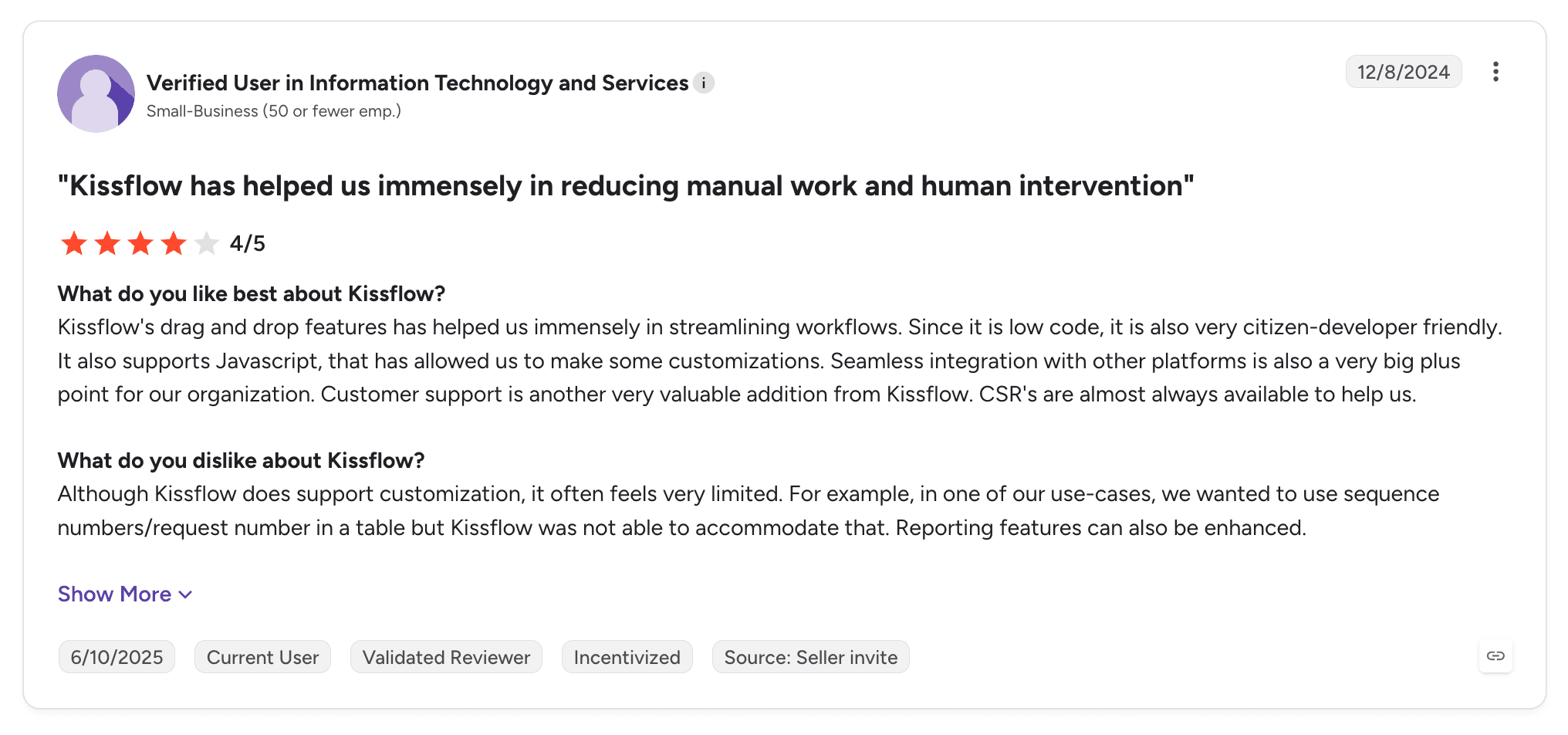
Kissflow is one of the easiest no-code tools for business teams to adopt alone. Reviewers describe reduced manual work and less human intervention.
Its clean interface suits teams new to workflow tools.
Pros
Business users build workflows alone
Clean interface and fast setup
Pre-built procurement flows
Forms and boards together
Responsive support
Cons
Customisation limits in complex processes
Integration issues with other systems
Access control gaps
Basic reporting
Limited write-back into ERP or core systems
Customer Reviews
Kissflow holds 4.3 out of 5 across 590 G2 reviews and 4.2 out of 5 across 88 Capterra reviews.
Reviewers praise ease of use and an interface that lets non-technical users build workflows.
The criticisms focus on customisation limits, integration issues and access control.
Final Verdict
Kissflow suits business teams that want approvals and procurement running without IT.
For multi-system processes with agents, exceptions and write-back, it reaches its limits quickly.
8. Pipefy

Overview
Pipefy is a no-code process tool that organises each workflow as a Kanban pipe. It serves more than 4,000 clients across 150+ countries and describes itself as a business orchestration and automation technology product.
Teams add forms per phase, automation rules, requester portals and AI agents through Agent Studio.
It fits departmental processes where many requesters submit work to a small team.
Ideal For
Department heads running request and approval processes
HR, procurement and finance teams
Teams needing requester portals
Organisations without developer capacity
Top Features
Pipes and phases. Kanban boards with phase forms.
Automation rules. Conditional logic without code.
Portals. Requesters submit and track work.
Agent Studio. AI agents inside pipes.
Why They Stand Out
Pipefy is one of the fastest tools for a department to set up alone. Reviewers describe organised, automated workflows without technical knowledge.
The Kanban model keeps status visible to everyone.
Pros
No-code setup without IT
Visible Kanban status
Customisable automation rules
Requester portals
Responsive support
Cons
Advanced features sit in higher tiers
Integration limits
Less flexible for sophisticated workflows
Departmental scope
Limited on-premises options
Customer Reviews
Pipefy holds 4.6 out of 5 across 231 G2 reviews and 4.6 out of 5 across 325 Capterra reviews.
Reviewers praise ease of use, flexible automation and an intuitive interface.
The criticisms focus on advanced features in higher tiers, integration issues and flexibility for complex workflows.

Final Verdict
Pipefy suits departments running request and approval processes without code.
For processes spanning several systems of record under audit, its departmental scope leaves gaps.
9. Nintex

Overview
Nintex is a process automation company focused on forms, workflows, documents and process mapping. More than 7,000 organisations use it, and it now positions its products around agentic business orchestration.
Its drag-and-drop designer, forms, document generation and e-signature through AssureSign serve business users, particularly in Microsoft environments.
It grew from SharePoint workflows and remains strong there.
Ideal For
Business teams digitising forms and approvals
Organisations moving legacy SharePoint workflows
Process excellence teams mapping and automating
Teams without developer capacity
Top Features
Drag-and-drop designer. Workflows with minimal coding.
Forms and documents. Capture data and generate documents.
E-signature. Signatures inside workflows.
Process mapping. Document current state first.
Why They Stand Out
Nintex is one of the most approachable no-code choices for forms and documents. Reviewers describe productivity gains from no-code automation.
Its SharePoint heritage makes it strong in Microsoft estates.
Pros
Quick to learn for business users
Forms, documents and e-signature together
SharePoint and Microsoft 365 integration
Process mapping included
Broad adoption
Cons
Advanced features take time to master
Performance can be unpredictable
Limited depth for complex orchestration
Cost concerns
Customer Reviews
Nintex holds 4.3 out of 5 across 1,322 G2 reviews, and Nintex Process Platform holds 4.4 out of 5 across 290 Capterra reviews.
Reviewers praise ease of use and building workflows with minimal coding.
The criticisms focus on advanced features, performance and cost.

Final Verdict
Nintex suits business teams automating forms, approvals and documents without code.
For multi-system processes with agents and one execution record per case, it covers the lighter end.
10. Dify

Overview
Dify is an open-source tool for building AI applications and agent workflows visually. It combines a workflow canvas, agents, RAG pipelines, model integrations and self-hosting.
Teams use it to build chatbots, AI assistants and AI workflows quickly, with the option to run it on their own infrastructure.
It suits technical teams building AI capabilities, and its visual canvas lets less technical users follow the logic.
Ideal For
Technical teams building AI applications and agents
Organisations needing self-hosted AI tooling
Teams building RAG-based assistants
Developers prototyping and shipping AI workflows
Top Features
Visual AI workflows. Chain model calls, tools and logic on a canvas.
Agents. Tool-using agents with model choice.
RAG pipelines. Knowledge retrieval for AI apps.
Self-hosting. Run on your own infrastructure.
Why They Stand Out
Dify is one of the smartest choices for teams building AI applications visually and self-hosting them. Reviewers describe workflow building made easy and fast custom app creation.
Being open source removes procurement friction for getting started.
Pros
Open source with self-hosting
Visual AI workflow building
Agents and RAG in one tool
Broad model integrations
Fast to start
Cons
Customer support draws criticism
Interface complexity grows with features
Learning curve for advanced workflows
No case, queue or process-level record
Small review base
Customer Reviews
Dify holds 4.1 out of 5 across 20 G2 reviews. Its Capterra listing has no reviews yet.
Reviewers praise ease of use, integrations and quick building of AI workflows and chatbots.
The criticisms focus on customer support, interface complexity and a learning curve, and one reviewer questions its readiness for production use.

Final Verdict
Dify suits technical teams building AI applications and agents with self-hosting.
When the business needs to operate a governed process with cases, operator work and write-back, it provides the AI building blocks, and the process layer has to come from elsewhere.
How to Choose the Best No Code Workflow Automation Software (What To Consider)?
No-code tools look similar in a demo, and the differences appear once workflows multiply and touch systems that matter. These six factors help you choose.
1. Decide What You Are Automating
Connecting two apps and running a business process need different tools. A Slack alert from a form submission needs a connector, while a claim that waits days for documents and approvals needs a process tool.
List the three workflows you most want automated and note how long each case stays open and how many systems it touches.
2. Check Who Changes the Workflow After Launch
No-code only pays off if the business owner can change the workflow later. Ask to see a rule change, a new approval step and a new exception path made by a non-developer.
Then ask how the change is tested and released, and whether cases already running are protected.
3. Plan for Exceptions and People
Most of the cost sits in the cases that do not follow the routine path. The tool should route those cases to a person with context attached and let them return to the same workflow.
Workflows that fail silently or restart from scratch create more manual work than they remove.
4. Confirm the Systems You Need to Reach
App connectors cover SaaS well, but many enterprise processes end in SAP, a core banking system or a proprietary system. Check whether the tool reads and writes to those systems without an API project.
If a workflow has to update the system of record, test that write-back during evaluation.
5. Keep IT in Control of the Right Things
No-code sprawl is a real risk. IT should own identity, credentials, deployment and which systems workflows may touch, while the business owns the logic.
Check role-based access, audit logs, versioning and where the tool can be deployed, including on-premises if your data requires it.
6. Start With One Process You Can Measure
Pick a workflow with clear volume, cycle time and error rate. Build it, measure it for a few weeks and compare against the baseline.
If the process runs from intake to a recorded outcome across several systems, our guide to the best end-to-end process automation software goes deeper.
Everything You Need to Know About No-Code Workflow Automation Software
Company | Pros | Cons | Ease of Use | Integrations | Support | Governance | Process Depth |
Noxus | Business-owned logic; write-back into systems of record; enterprise governance | Sales-led evaluation; operational focus; small public review base | ⭐⭐⭐⭐ | ⭐⭐⭐⭐⭐ | ⭐⭐⭐⭐⭐ | ⭐⭐⭐⭐⭐ | ⭐⭐⭐⭐⭐ |
Microsoft Power Automate | Microsoft 365 fit; templates; approvals built in | Hard to debug; weaker outside Microsoft; state spread across tools | ⭐⭐⭐⭐⭐ | ⭐⭐⭐⭐ | ⭐⭐⭐ | ⭐⭐⭐⭐ | ⭐⭐⭐ |
Zapier | Fastest start; huge app library; AI features | Cost at volume; limited complex logic; troubleshooting | ⭐⭐⭐⭐⭐ | ⭐⭐⭐⭐⭐ | ⭐⭐⭐⭐ | ⭐⭐ | ⭐⭐ |
Make | Visual complex logic; error handling; value | Learning curve; organisation at scale; credit usage | ⭐⭐⭐⭐ | ⭐⭐⭐⭐⭐ | ⭐⭐⭐⭐ | ⭐⭐ | ⭐⭐⭐ |
n8n | Self-hosting; code nodes; 500+ integrations | Learning curve; large workflows hard to manage; engineering ownership | ⭐⭐⭐ | ⭐⭐⭐⭐⭐ | ⭐⭐⭐ | ⭐⭐⭐ | ⭐⭐⭐ |
Workato | Enterprise connectors; strong support; governance | Learning curve; complexity; missing features | ⭐⭐⭐⭐ | ⭐⭐⭐⭐⭐ | ⭐⭐⭐⭐⭐ | ⭐⭐⭐⭐ | ⭐⭐⭐ |
Kissflow | Business users build alone; clean interface; procurement flows | Customisation limits; integration issues; access control | ⭐⭐⭐⭐⭐ | ⭐⭐⭐ | ⭐⭐⭐⭐ | ⭐⭐⭐ | ⭐⭐ |
Pipefy | Fast departmental setup; visible status; support | Higher-tier features; integration limits; departmental scope | ⭐⭐⭐⭐⭐ | ⭐⭐⭐ | ⭐⭐⭐⭐ | ⭐⭐⭐ | ⭐⭐ |
Nintex | Quick to learn; forms and documents; SharePoint | Advanced features take time; performance; cost | ⭐⭐⭐⭐ | ⭐⭐⭐ | ⭐⭐⭐⭐ | ⭐⭐⭐ | ⭐⭐⭐ |
Dify | Open source; visual AI workflows; self-hosting | Support; interface complexity; no process-level record | ⭐⭐⭐ | ⭐⭐⭐⭐ | ⭐⭐ | ⭐⭐ | ⭐⭐ |
Build Your First Governed No-Code Process with Noxus
Noxus lets operations teams build processes without code and run them under enterprise governance. Process owners design the workflow visually, agents handle the reading and classification, people handle approvals, and outcomes are written into SAP, Guidewire, ServiceNow or your core systems with every action recorded.
IT keeps control of identity, credentials, deployment and model endpoints, with shared cloud, customer VPC, on-premises and air-gapped options, bring-your-own-key encryption and no training on your data. If the relationship ends, you keep all code and binaries.
Santander runs branch operations as a governed process across five countries on its own infrastructure, live in under 90 days. CUF resolves over 10,000 patient communications a month under GDPR Article 9.
Book a demo with Noxus and bring the process your team would change tomorrow if it did not need an IT ticket.
FAQs About No-Code Workflow Automation Software
What is no code workflow automation software used for?
No code workflow automation software is used for building automated workflows on a visual canvas without writing code. Teams use it to connect apps, route approvals, process requests, move data between systems and, with process tools, run multi-day cases across enterprise systems. It lets the people who own a process build and change the automation without an IT development cycle.
What is the best no code workflow automation software in 2026?
Noxus is the best no code workflow automation software in 2026 for enterprise operations teams running processes across legacy systems. Process owners build visually, and workflows hold case state, route exceptions and write outcomes into SAP, Guidewire and core banking systems under central governance, including on-premises and air-gapped. Zapier and Make suit fast app connections, Power Automate suits Microsoft 365 teams, and Kissflow and Pipefy suit departmental approvals.
What should I consider when choosing the right no code workflow automation tools for me?
When choosing no code workflow automation tools, consider whether you are connecting apps or running a business process, and who will change the workflow after launch. Check how exceptions reach people, which systems the tool can write to and what controls IT keeps over identity, deployment and audit. Then start with one measurable process before scaling.
What features should I look for in no-code workflow automation software?
The features to look for in no-code workflow automation software are a visual builder business users can change, human tasks that return to the same workflow, connectors to the systems you need, versioned releases and audit logs. For enterprise processes, add persistent case state, write-back into systems of record and deployment options that meet your data requirements. For AI steps, check how model access is governed.
How does Noxus differ from similar alternatives?
Noxus differs from similar alternatives by giving business teams no-code control over processes that run in production across legacy systems under enterprise governance. Zapier and Make connect SaaS apps, Kissflow and Pipefy run departmental workflows, and n8n and Dify suit technical builders. Noxus holds case state, routes exceptions to people, writes into SAP and core systems, and deploys on-premises or air-gapped.
How do I get started with Noxus?
You get started with Noxus by choosing one high-volume process with a clear outcome and an owner who wants to change it. Noxus maps how it runs today, quantifies the value and designs it for AI execution with human oversight. The process is then built and proven on your live systems within weeks against criteria set upfront, with the engagement model targeting 30 days from process to production.
How easy is it to switch to Noxus?
Switching to Noxus usually starts with one process, while existing no-code automations keep running for simpler tasks. The process knowledge, rules and exception paths carry over into the Noxus visual editor, and flows built in Noxus can be exported as JSON between workspaces. Noxus deployments have reached production in 45 to 80 days on client systems.
Will no-code automation create governance problems for IT?
No-code automation creates governance problems when every team builds workflows with their own credentials, logic and hosting, which leaves IT to manage automations it never designed. Noxus avoids that by running every business-built process under one model with workspaces, role-based permissions, scoped API keys, versioned releases and tamper-proof audit logs. IT keeps control of identity, deployment and which systems and model endpoints a process may use, while the business owns the process logic.






